



Bouw je eigen UFO Attack Game met Arduino UNO & MAX7219 Display
Onderdelen en benodigdheden
| Onderdeel | Aantal |
|---|---|
| Arduino UNO | 1 |
| MAX7219 Dot Matrix Module 4-in-1 Display | 1 |
| DB9 9-pins terminal breakout board | 1 |
| Algemene NPN-transistor | 1 |
| Breadboard | 1 |
| Adafruit Passieve piezo buzzer | 1 |
| Male/Female jumper wires | 5 |
| Jumper wires (gemengd) | 10 |
| Weerstand 1k Ω | 1 |
| Atari-compatibele 9-pins joystick | 1 |
Over dit project
Ik bouwde dit spel met een Arduino UNO, een "4-in-1" MAX7219 matrix-display en onderdelen uit een Arduino Starter Kit. De code is zelfgeschreven en gebruikt de Max72xxPanel, Adafruit GFX en SPI bibliotheken.
Elk level heeft een doel aantal UFO's om neer te schieten voordat de boss verschijnt. Je hebt een Atari-compatibele 9-pins joystick nodig (of bouw er zelf een). Toekomstige versies worden een handheld console.
Code
UFO Attack Code (C/C++)
/* UFO ATTACK! - Written by Anthony Clarke. */
/* Some lines from open source examples, labeled in comments. */
#include
#include
#include

const int pinCS = 10;
const int numberOfHorizontalDisplays = 4;
const int numberOfVerticalDisplays = 1;
Max72xxPanel matrix = Max72xxPanel(pinCS, numberOfHorizontalDisplays, numberOfVerticalDisplays);

// Bitmaps voor sprites (8x8 pixels)
const unsigned char ship[] PROGMEM = { 0x80, 0xe0, 0x00, 0x00, 0x00, 0x00, 0x00, 0x00 };
const unsigned char ufo[] PROGMEM = { 0x40, 0xe0, 0x00, 0x00, 0x00, 0x00, 0x00, 0x00 };
const unsigned char explosion[] PROGMEM = { 0xe0, 0xe0, 0xe0, 0x00, 0x00, 0x00, 0x00, 0x00 };
const unsigned char bouncer[] PROGMEM = { 0x60, 0xc0, 0x60, 0x00, 0x00, 0x00, 0x00, 0x00 };
const unsigned char boss[] PROGMEM = { 0x18, 0x24, 0x42, 0xff, 0x24, 0xff, 0x7e, 0x3c };
const unsigned char faller[] PROGMEM = { 0x80, 0xc0, 0xe0, 0x00, 0x00, 0x00, 0x00, 0x00 };
const unsigned char riser[] PROGMEM = { 0xe0, 0xc0, 0x80, 0x00, 0x00, 0x00, 0x00, 0x00 };
const unsigned char LT[] PROGMEM = { 0x78, 0xfc, 0x30, 0x00, 0x00, 0x00, 0x00, 0x00 };
const unsigned char ufoLaser[] PROGMEM = { 0xc0, 0x00, 0x00, 0x00, 0x00, 0x00, 0x00, 0x00 };
const unsigned char bossBoom1[] PROGMEM = { 0xaa, 0x55, 0xa2, 0x51, 0x8a, 0x45, 0xaa, 0x55 };
const unsigned char bossBoom2[] PROGMEM = { 0x55, 0xaa, 0x45, 0x8a, 0x51, 0xa2, 0x55, 0xaa };

// Variabelen voor game state, posities, timers, etc.
// ... (volledige code in origineel)

void setup() {
  pinMode(buzzerPin, OUTPUT);
  pinMode(up, INPUT_PULLUP); pinMode(down, INPUT_PULLUP);
  pinMode(left, INPUT_PULLUP); pinMode(right, INPUT_PULLUP);
  pinMode(trigger, INPUT_PULLUP);
  matrix.setIntensity(0);
  matrix.setPosition(0, 3, 0); matrix.setPosition(1, 2, 0);
  matrix.setPosition(2, 1, 0); matrix.setPosition(3, 0, 0);
  matrix.setRotation(0, 3); matrix.setRotation(1, 3);
  matrix.setRotation(2, 3); matrix.setRotation(3, 3);
  matrix.fillScreen(LOW);
}

void loop() {
  if (!gameStart) Ticker(true);
  SpawnTimer(); JoystickControl(); UfoControl(); BouncerControl();
  LaserControl(); ScreenLimit(); BossBattle(); BossControl();
  UFOLaserControl(); LTControl(); FallerControl(); RiserControl();
  ShipCollision();
  matrix.write(); delay(50); matrix.fillScreen(LOW);
}

// Functies voor spawn, besturing, botsing, geluid, levels, etc.
// Zie originele code voor complete implementatie.
De volledige code is te lang om hier weer te geven; download de sketch via de GitHub-link in het originele project.
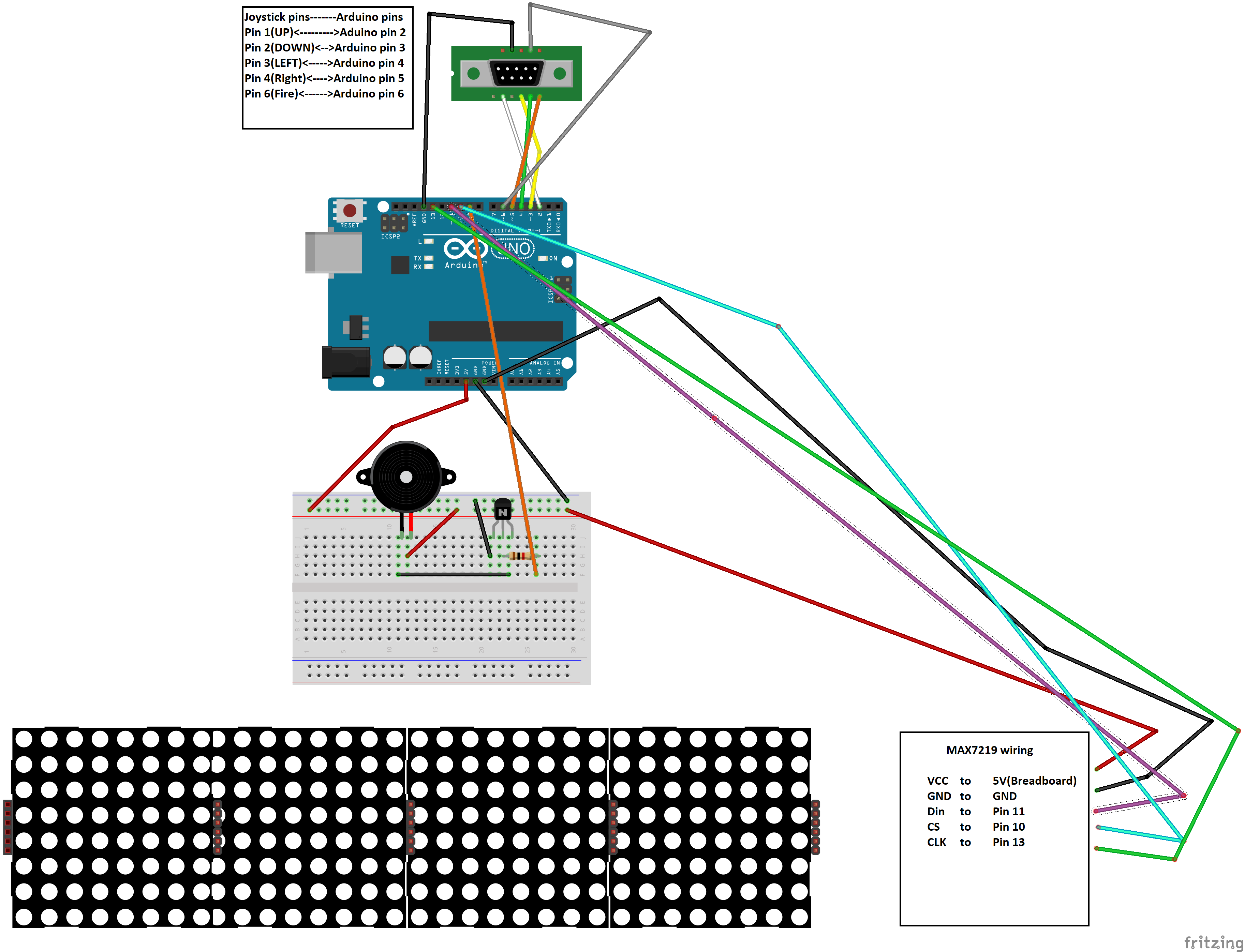
Schema's
Slimme Plantenalarmer – DIY Sensor voor Optimale Hydratatie
Waterdruppels vastleggen met Arduino Nano – DIY High-Speed Fotografie
Productieproces
- Arduino Digitale Dobbelsteen: Bouw Je Eigen LCD-willekeurige Getalgenerator
- Water-aangedreven vuureffect: Arduino UNO + NeoPixel Stick project
- 3D RGB Arduclock – Bluetooth LED Tijdstuk met Real-Time Clock
- Riviergezondheidsmonitor: Arduino-gebaseerd Waterkwaliteitssysteem
- Een Arduino Iron Man bouwen: onderdelen, sensoren en stapsgewijze handleiding
- Interactieve Joystick Game met Arduino en LED Feedback
- Find Me: Slimme Item Locator met Arduino en Bluetooth
- Bouw een Functionele, Arduino-aangedreven 3D-geprinte Robotarm – Stap-voor-Stap Handleiding
- Draagbare Afstandsdetector – Arduino Nano DIY Kit met HC-SR04, 18650 Accu en 3D-geprinte Behuizing
- DIY Arduino Luchtbevochtiger Controller met Relais – Veilige Hoogspanningsopstelling
- Arduino-aangedreven mini-rover: Bouw je eigen autonome robot