



Arduino Touch Breakout-spel: Bouw een Klassieke Arcade op een 2,4″ TFT LCD
Onderdelen en benodigdheden
| Arduino UNO | × | 1 |
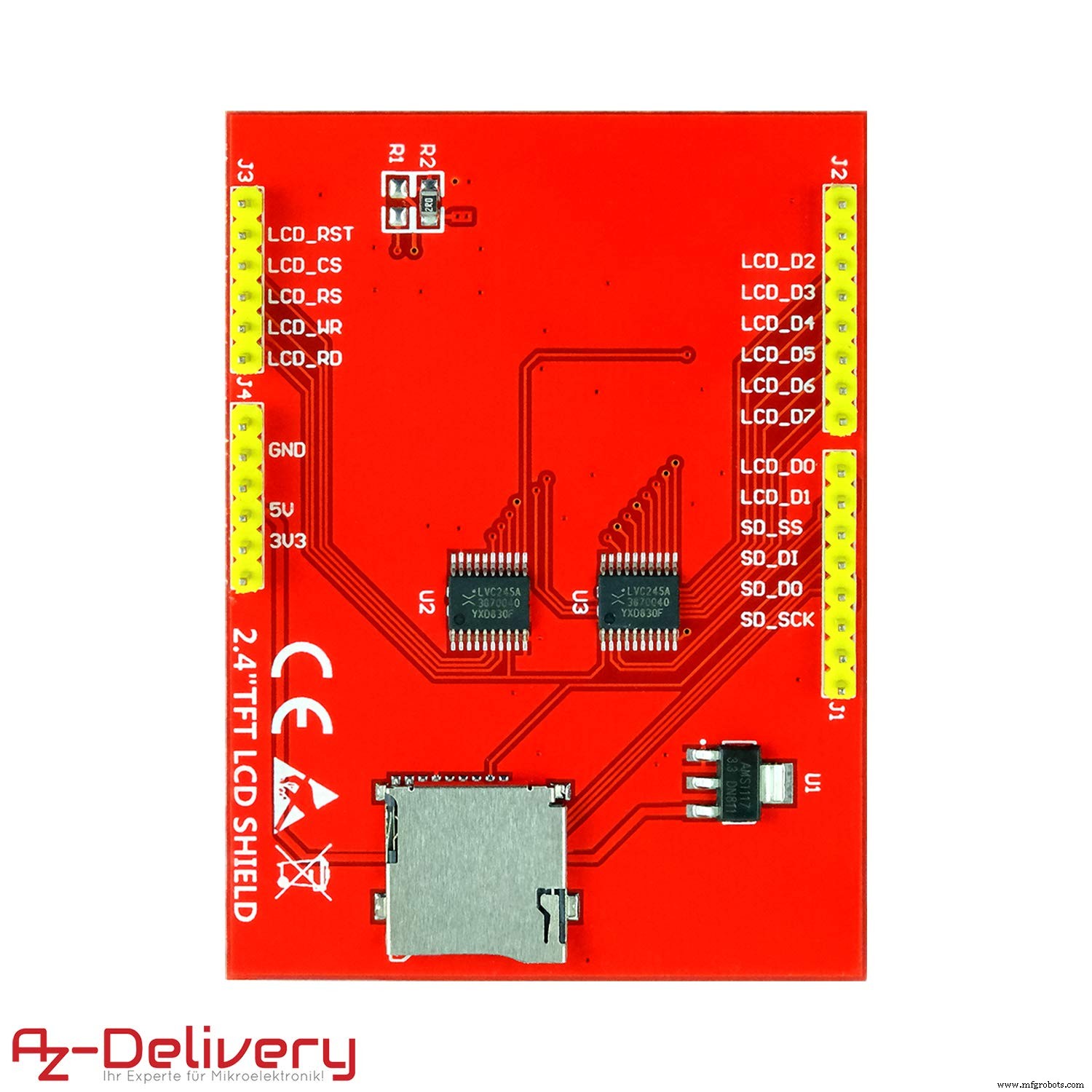
| AZ-Delivery 2.4 TFT LCD Touch Display Arduino Shield | × | 1 |
Apps en online diensten
- Arduino IDE
Over dit project
Dit is een kleine versie van de klassieke Breakout-videogame voor Arduino UNO en TFT LCD-scherm (240x320 pixels), driver ILI9341 met 8-bit parallele communicatie.
Het spel
Deze Breakout heeft meerdere schermen met verschillende configureerbare rijen en kolommen stenen, tot acht rijen, waarbij elke twee rijen een andere kleur hebben, die aan of uit geprogrammeerd kunnen worden met verschillende patronen. Met een enkele bal moet de speler, met het touchpanel, zoveel mogelijk stenen omverwerpen door de muren en/of de peddel eronder te gebruiken om de bal tegen de stenen te laten botsen en ze te elimineren. Als de speler de bal met de peddel mist, verliest hij een beurt.
Elke rij stenen levert verschillende punten op.
uint8_t pointsForRow[] = {7, 7, 5, 5, 3, 3 , 1, 1};Elk level kan de peddelgrootte en balgrootte configureren. Balsnelheid neemt toe bij elke botsting, je kunt de beginsnelheid voor elk scherm configureren. Afhankelijk van het punt van de peddel dat de bal raakt, verandert ook de horizontale snelheid.
Je kunt nieuwe schermen definiëren met verschillende muurpatronen:


Hoe te spelen
Houd het apparaat met je handen en gebruik je duimen over het scherm om de peddel naar links of rechts te bewegen.

Een nieuw scherm definiëren
Deze structuur wordt gebruikt om een nieuw scherm te definiëren:
typedef struct game_type {
  int ballsize;
  int playerwidth;
  int playerheight;
  int exponent;
  int top;
  int rows;
  int columns;
  int brickGap;
  int lives;
  int wall[GAMES_NUMBER];
  int initVelx;
  int initVely;
} game_type;
en voeg het nieuwe scherm toe aan de set:
game_type games[GAMES_NUMBER] =
  // ballsize, playerwidth, playerheight, exponent, top, rows, columns, brickGap, lives, wall[8], initVelx, initVely
  {
    { 10, 60, 8, 6, 40 , 8, 8, 3, 3, {0x18, 0x66, 0xFF, 0xDB, 0xFF, 0x7E, 0x24, 0x3C} , 28, -28},
    // ... meer levels
  };
Muurpatroon
Muurpatroon wordt gedefinieerd als 8x8 bit-array
bijv.
{0xAA, 0xAA, 0xAA, 0xAA, 0xAA, 0xAA, 0xAA, 0xAA}wat overeenkomt met deze bit-array
1,0,1,0,1,0,1,0
1,0,1,0,1,0,1,0
1,0,1,0,1,0,1,0
1,0,1,0,1,0,1,0
1,0,1,0,1,0,1,0
1,0,1,0,1,0,1,0
1,0,1,0,1,0,1,0
1,0,1,0,1,0,1,0
Dit produceert deze muur, let op dat gespiegeld is:

Hardware
Dit project gebruikt een AZ-Delivery 2,4 inch TFT LCD-display met resistieve 4-draads touchscreen en een geïntegreerde SD-kaartlezer.

Meer over deze shield in mijn artikel "Road testing an AZ-Delivery 2,4 TFT LCD Touch Display"
De shield monteren
Je hoeft alleen de shield op de Arduino te steken.


Bibliotheken
#include <Adafruit_GFX.h> // Core graphics library
#include <Adafruit_TFTLCD.h>
#include <TouchScreen.h>
Touchscreen kalibreren
Je moet het display kalibreren zodat de positie-informatie correct is wanneer je het display aanraakt. De MCUFriend_kbv bibliotheek biedt een voorbeeld met de naam "TouchScreen_Calibr_native". Het voorbeeld stuurt de resultaten naar de seriële poort. Start de seriële monitor van de Arduino IDE zodat je de gegenereerde code kunt kopiëren.
Volg de instructies op het touch-display, druk en houd de positie-markers die getoond worden, die wit zijn gehighlight. Zodra je alle positie-markers gedaan hebt, wordt de kalibratie van het display op het touch-display en via de seriële poort uitgegeven.
Voor dit project heb je de data voor de "portrait calibration" nodig.
TouchScreen.h GFX Calibration
Making all control and bus pins INPUT_PULLUP
Typical 30k Analog pullup with corresponding pin
would read low when digital is written LOW
e.g. reads ~25 for 300R X direction
e.g. reads ~30 for 500R Y direction
Testing : (A2, D8) = 26
Testing : (A3, D9) = 28
ID = 0x9341
cx=153 cy=103 cz=534 X, Y, Pressure
cx=150 cy=475 cz=406 X, Y, Pressure
cx=155 cy=868 cz=231 X, Y, Pressure
cx=517 cy=103 cz=561 X, Y, Pressure
cx=535 cy=855 cz=364 X, Y, Pressure
cx=884 cy=88 cz=650 X, Y, Pressure
cx=908 cy=478 cz=557 X, Y, Pressure
cx=902 cy=864 cz=488 X, Y, Pressure
*** COPY-PASTE from Serial Terminal:
const int XP=8,XM=A2,YP=A3,YM=9; //240x320 ID=0x9341
const int TS_LEFT=118,TS_RT=931,TS_TOP=72,TS_BOT=887;
PORTRAIT CALIBRATION 240 x 320
x = map(p.x, LEFT=118, RT=931, 0, 240)
y = map(p.y, TOP=72, BOT=887, 0, 320)
LANDSCAPE CALIBRATION 320 x 240
x = map(p.y, LEFT=72, RT=887, 0, 320)
y = map(p.x, TOP=931, BOT=118, 0, 240)
Animatie
Om de afbeelding over het scherm te bewegen in de tijd, gebruiken we een statische snelheid en passen we die toe op de positie van een afbeelding elke tijdstap.
pos += vel * dt;Drijvende-komma rekenkunde vermijden
ILI9341-resolutie is 240 x 320, dus we hebben twee 9-bit integers nodig om een pixel op het scherm te refereren. Met 16-bit integers blijven 6 bits over voor een decimaal deel.
nnnn nnnn nndd ddddWe noemen dit getal, 6, de binaire exponent. En we kunnen deze 6 bits gebruiken om een decimaal deel van 0,000 tot 0,63 voor te stellen. Dus we kunnen integer-rekenkunde gebruiken en drijvende-komma rekenkunde vermijden.
Om het gehele deel van het getal te krijgen, maken we een rechter-arithmetische shift.
number >> exponentstate.ballx += state.velx;
state.bally += state.vely;
// check ball collisions and exit
checkBallCollisions(game, &state, state.ballx >> game->exponent, state.bally >> game->exponent);
checkBallExit(game, &state, state.ballx >> game->exponent, state.bally >> game->exponent);Demo-modus
Uncomment de Define Directive en de peddel volgt de bal zoals in de demo-video's te zien:
#define DEMO_MODEVeel plezier!
Maak nieuwe patronen en levels en deel ze!
Code
- Arduino Breakout
Arduino Breakout Arduino
/* Arduino Touch TFT Breakout
Classic breakout game
Parts needed:
Ardunio UNO
AZ-Delivery 2.4 TFT LCD Touch Display Arduino Shield or compatible
This example code is in the public domain.
Modified 07 11 2020
By Enrique Albertos */
// #define DEMO_MODE
#include <Adafruit_GFX.h> // Core graphics library
#include <Adafruit_TFTLCD.h>
#include <TouchScreen.h>
#define BLACK 0x0000
#define BLUE 0x001F
#define RED 0xF800
#define GREEN 0x07E0
#define CYAN 0x07FF
#define MAGENTA 0xF81F
#define YELLOW 0xFFE0
#define WHITE 0xFFFF
#define PRIMARY_COLOR 0x4A11
#define PRIMARY_LIGHT_COLOR 0x7A17
#define PRIMARY_DARK_COLOR 0x4016
#define PRIMARY_TEXT_COLOR 0x7FFF
#define LCD_CS A3 // Chip Select goes to Analog 3
#define LCD_CD A2 // Command/Data goes to Analog 2
#define LCD_WR A1 // LCD Write goes to Analog 1
#define LCD_RD A0 // LCD Read goes to Analog 0
#define LCD_RESET A4 // Can alternately just connect to Arduino's reset pin
Adafruit_TFTLCD tft(LCD_CS, LCD_CD, LCD_WR, LCD_RD, LCD_RESET);
#define LOWFLASH (defined(__AVR_ATmega328P__) && defined(MCUFRIEND_KBV_H_))
// Touch screen pressure threshold
#define MINPRESSURE 40
#define MAXPRESSURE 1000
// Touch screen calibration
const int16_t XP = 8, XM = A2, YP = A3, YM = 9; //240x320 ID=0x9341
const int16_t TS_LEFT = 122, TS_RT = 929, TS_TOP = 77, TS_BOT = 884;
const TouchScreen ts = TouchScreen(XP, YP, XM, YM, 300);
#define SCORE_SIZE 30
char scoreFormat[] = "%04d";
typedef struct gameSize_type {
int16_t x, y, width, height;
} gameSize_type;
gameSize_type gameSize;
uint16_t backgroundColor = BLACK;
int level;
const uint8_t BIT_MASK[] = {0x01, 0x02, 0x04, 0x08, 0x10, 0x20, 0x40, 0x80};
uint8_t pointsForRow[] = {7, 7, 5, 5, 3, 3 , 1, 1};
#define GAMES_NUMBER 16
typedef struct game_type {
int ballsize;
int playerwidth;
int playerheight;
int exponent;
int top;
int rows;
int columns;
int brickGap;
int lives;
int wall[GAMES_NUMBER];
int initVelx;
int initVely;
} game_type;
game_type games[GAMES_NUMBER] =
// ballsize, playerwidth, playerheight, exponent, top, rows, columns, brickGap, lives, wall[8], initVelx, initVely
{
{ 10, 60, 8, 6, 40 , 8, 8, 3, 3, {0x18, 0x66, 0xFF, 0xDB, 0xFF, 0x7E, 0x24, 0x3C} , 28, -28},
{ 10, 50, 8, 6, 40 , 8, 8, 3, 3, {0xFF, 0x99, 0xFF, 0xE7, 0xBD, 0xDB, 0xE7, 0xFF} , 28, -28},
{ 10, 50, 8, 6, 40 , 8, 8, 3, 3, {0xAA, 0x55, 0xAA, 0x55, 0xAA, 0x55, 0xAA, 0x55} , 28, -28},
{ 8, 50, 8, 6, 40 , 8, 8, 3, 3, {0xFF, 0xC3, 0xC3, 0xC3, 0xC3, 0xC3, 0xC3, 0xFF} , 34, -34},
{ 10, 40, 8, 6, 40 , 8, 8, 3, 3, {0xFF, 0xAA, 0xAA, 0xFF, 0xFF, 0xAA, 0xAA, 0xFF} , 28, -28},
{ 10, 40, 8, 6, 40 , 8, 8, 3, 3, {0xAA, 0xAA, 0xAA, 0xAA, 0xAA, 0xAA, 0xAA, 0xAA} , 28, -28},
{ 12, 64, 8, 6, 60 , 4, 2, 3, 4, {0xFF, 0xFF, 0xFF, 0xFF, 0xFF, 0xFF, 0xFF, 0xFF} , 20, -20},
{ 12, 60, 8, 6, 60 , 5, 3, 3, 4, {0xFF, 0xFF, 0xFF, 0xFF, 0xFF, 0xFF, 0xFF, 0xFF} , 22, -22},
{ 10, 56, 8, 6, 30 , 6, 4, 3, 4, {0xFF, 0xFF, 0xFF, 0xFF, 0xFF, 0xFF, 0xFF, 0xFF} , 24, -24},
{ 10, 52, 8, 6, 30 , 7, 5, 3, 4, {0xFF, 0xFF, 0xFF, 0xFF, 0xFF, 0xFF, 0xFF, 0xFF} , 26, -26},
{ 8, 48, 8, 6, 30 , 8, 6, 3, 3, {0xFF, 0xFF, 0xFF, 0xFF, 0xFF, 0xFF, 0xFF, 0xFF} , 28, -28},
{ 8, 44, 8, 6, 30 , 8, 7, 3, 3, {0xFF, 0xFF, 0xFF, 0xFF, 0xFF, 0xFF, 0xFF, 0xFF} , 30, -30},
{ 8, 40, 8, 6, 30 , 8, 8, 3, 3, {0xFF, 0xFF, 0xFF, 0xFF, 0xFF, 0xFF, 0xFF, 0xFF} , 32, -32},
{ 8, 36, 8, 6, 40 , 8, 8, 3, 3, {0xFF, 0xFF, 0xFF, 0xFF, 0xFF, 0xFF, 0xFF, 0xFF} , 34, -34},
{ 8, 36, 8, 6, 40 , 8, 8, 3, 3, {0xAA, 0xAA, 0xAA, 0xAA, 0xAA, 0xAA, 0xAA, 0xAA} , 34, -34}
};
game_type* game;
typedef struct game_state_type {
uint16_t ballx;
uint16_t bally;
uint16_t ballxold;
uint16_t ballyold;
int velx;
int vely;
int playerx;
int playerxold;
int wallState[8];
int score;
int remainingLives;
int top;
int bottom;
int walltop;
int wallbottom ;
int brickheight;
int brickwidth;
} game_state_type;
state;
//////////////////////////////////////////////////////////////
// ARDUINO SETUP
//////////////////////////////////////////////////////////////
void setup() {
initTft(tft);
gameSize = {0, 0, tft.width(), tft.height()};
newGame(&games[0], &state, tft);
}
//////////////////////////////////////////////////////////////
// ARDUINO LOOP
//////////////////////////////////////////////////////////////
int selection = -1;
void loop(void) {
selection = readUiSelection(game, &state, selection);
drawPlayer(game, &state);
// store old position to remove old pixels
state.playerxold = state.playerx;
// calculate new ball position x1 = x0 + vx * dt
// check max speed
if (abs( state.vely) > ((1 << game->exponent) - 1)) {
state.vely = ((1 << game->exponent) - 1) * ((state.vely > 0) - (state.vely < 0));
}
if (abs( state.velx) > ((1 << game->exponent) - 1)) {
state.velx = ((1 << game->exponent) - 1) * ((state.velx > 0) - (state.velx < 0));
}
state.ballx += state.velx;
state.bally += state.vely;

// check ball collisions and exit
checkBallCollisions(game, &state, state.ballx >> game->exponent, state.bally >> game->exponent);
checkBallExit(game, &state, state.ballx >> game->exponent, state.bally >> game->exponent);
// draw ball in new position
drawBall(state.ballx >> game->exponent, state.bally >> game->exponent, state.ballxold >> game->exponent, state.ballyold >> game->exponent, game->ballsize );
// store old position to remove old pixels
state.ballxold = state.ballx;
state.ballyold = state.bally;
// increment velocity
state.velx = (20 + (state.score >> 3 )) * ( (state.velx > 0) - (state.velx < 0));
state.vely = (20 + (state.score >> 3 )) * ( (state.vely > 0) - (state.vely < 0));
// if no bricks go to next level
if (noBricks(game, &state) && level < GAMES_NUMBER) {
level++;
newGame( &games[level], &state, tft);
} else if ( state.remainingLives <= 0) {
gameOverTouchToStart();
state.score = 0;
level = 0;
newGame(game, &state, tft);
}
}
void newGame(game_type* newGame, game_state_type * state, Adafruit_TFTLCD &tft) {
game = newGame;
setupState(game, state, tft);
clearDialog(gameSize);
updateLives(game->lives, state->remainingLives);
updateScore(state->score);
setupWall(game, state);
touchToStart();
clearDialog(gameSize);
updateLives(game->lives, state->remainingLives);
updateScore(state->score);
setupWall(game, state);
}
void setupStateSizes(game_type* game, game_state_type * state, Adafruit_TFTLCD &tft) {
state->bottom = tft.height() - 30;
state->brickwidth = tft.width() / game->columns;
state->brickheight = tft.height() / 24;
}
void setupState(game_type* game, game_state_type * state, Adafruit_TFTLCD &tft) {
setupStateSizes(game, state, tft);
for (int i = 0; i < game->rows ; i ++) {
state->wallState[i] = 0;
}
state->playerx = tft.width() / 2 - game->playerwidth / 2;
state->remainingLives = game->lives;
state->bally = state->bottom << game->exponent;
state->ballyold = state->bottom << game->exponent;
state->velx = game->initVelx;
state->vely = game->initVely;
}
void updateLives(int lives, int remainingLives) {
for (int i = 0; i < lives; i++) {
tft.fillCircle((1 + i) * 15, 15, 5, BLACK);
}
for (int i = 0; i < remainingLives; i++) {
tft.fillCircle((1 + i) * 15, 15, 5, YELLOW);
}
}
void setupWall(game_type * game, game_state_type * state) {
int colors[] = {RED, RED, BLUE, BLUE, YELLOW, YELLOW, GREEN, GREEN};
state->walltop = game->top + 40;
state->wallbottom = state->walltop + game->rows * state->brickheight;
for (int i = 0; i < game->rows; i++) {
for (int j = 0; j < game->columns; j++) {
if (isBrickIn(game->wall, j, i)) {
setBrick(state->wallState, j, i);
drawBrick(state, j, i, colors[i]);
}
}
}
}
void drawBrick(game_state_type * state, int xBrick, int yBrickRow, uint16_t backgroundColor) {
tft.fillRect((state->brickwidth * xBrick) + game->brickGap, state->walltop + (state->brickheight * yBrickRow) + game->brickGap , state->brickwidth - game->brickGap * 2, state->brickheight - game->brickGap * 2, backgroundColor);
}
boolean noBricks(game_type * game, game_state_type * state) {
for (int i = 0; i < game->rows ; i++) {
if (state->wallState[i]) return false;
}
return true;
}
void drawPlayer(game_type * game, game_state_type * state) {
// paint
tft.fillRect(state->playerx, state->bottom, game->playerwidth, game->playerheight, YELLOW);
if (state->playerx != state->playerxold) {
// remove old pixels
if (state->playerx < state->playerxold) {
tft.fillRect(state->playerx + game->playerwidth, state->bottom, abs(state->playerx - state->playerxold), game->playerheight, backgroundColor);
} else {
tft.fillRect(state->playerxold, state->bottom, abs(state->playerx - state->playerxold), game->playerheight, backgroundColor);
}
}
}
void drawBall(int x, int y, int xold, int yold, int ballsize) {
// remove old pixels
//if (xold != x && yold != y) {
if (xold <= x && yold <= y) {
tft.fillRect(xold , yold, ballsize, y - yold, BLACK);
tft.fillRect(xold , yold, x - xold, ballsize, BLACK);
} else if (xold >= x && yold >= y) {
tft.fillRect(x + ballsize , yold, xold - x, ballsize, BLACK);
tft.fillRect(xold , y + ballsize, ballsize, yold - y, BLACK);
} else if (xold <= x && yold >= y) {
tft.fillRect(xold , yold, x - xold, ballsize, BLACK);
tft.fillRect(xold , y + ballsize, ballsize, yold - y, BLACK);
} else if (xold >= x && yold <= y) {
tft.fillRect(xold , yold, ballsize, y - yold, BLACK);
tft.fillRect(x + ballsize, yold, xold - x, ballsize, BLACK);
}
// paint new ball
tft.fillRect(x , y, ballsize, ballsize, YELLOW);
// }
}
void touchToStart() {
drawBoxedString(0, 200, " BREAKOUT", 3, YELLOW, BLACK);
drawBoxedString(0, 240, " TOUCH TO START", 2, RED, BLACK);
while (waitForTouch() < 0) {}
}
void gameOverTouchToStart() {
drawBoxedString(0, 180, " GAME OVER", 3, YELLOW, BLACK);
drawBoxedString(0, 220, " TOUCH TO START", 2, RED, BLACK);
while (waitForTouch() < 0) {}
}
void updateScore (int score) {
char buffer[5];
snprintf(buffer, sizeof(buffer), scoreFormat, score);
drawBoxedString(tft.width() - 50, 6, buffer, 2, YELLOW, PRIMARY_DARK_COLOR);
}
void checkBrickCollision(game_type* game, game_state_type * state, uint16_t x, uint16_t y) {
int x1 = x + game->ballsize;
int y1 = y + game->ballsize;
int collissions = 0;
collissions += checkCornerCollision(game, state, x, y);
collissions += checkCornerCollision(game, state, x1, y1);
collissions += checkCornerCollision(game, state, x, y1);
collissions += checkCornerCollision(game, state, x1, y);
if (collissions > 0 ) {
state->vely = (-1 * state->vely);
if ((((x % state->brickwidth) == 0) && ( state->velx < 0 )) || ((((x + game->ballsize) % state->brickwidth) == 0) && ( state->velx > 0 )) ) {
state->velx = (-1 * state->velx);
}
}
}
int checkCornerCollision(game_type * game, game_state_type * state, uint16_t x, uint16_t y) {
if ((y > state->walltop) && (y < state->wallbottom)) {
int yBrickRow = ( y - state->walltop) / state->brickheight;
int xBrickColumn = (x / state->brickwidth);
if (isBrickIn(state->wallState, xBrickColumn, yBrickRow) ) {
hitBrick(state, xBrickColumn, yBrickRow);
return 1;
}
}
return 0;
}
void hitBrick(game_state_type * state, int xBrick, int yBrickRow) {
state->score += pointsForRow[yBrickRow];
drawBrick(state, xBrick, yBrickRow, WHITE);
delay(16);
drawBrick(state, xBrick, yBrickRow, BLUE);
delay(8);
drawBrick(state, xBrick, yBrickRow, backgroundColor);
unsetBrick(state->wallState, xBrick, yBrickRow);
updateScore(state->score);
}
void checkBorderCollision(game_type * game, game_state_type * state, uint16_t x, uint16_t y) {
// check wall collision
if (x + game->ballsize >= tft.width()) {
state->velx = -abs(state->velx);
}
if (x <= 0 ) {
state->velx = abs(state->velx);
}
if (y <= SCORE_SIZE ) {
state->vely = abs(state->vely);
}
if (((y + game->ballsize) >= state->bottom) && ((y + game->ballsize) <= (state->bottom + game->playerheight)) && (x >= state->playerx) && (x <= (state->playerx + game->playerwidth))) {
// change vel x near player borders
if (x > (state->playerx + game->playerwidth - 6)) {
state->velx = state->velx - 1;
} else if (x < state->playerx + 6) {
state->velx = state->velx + 1;
}
state->vely = -abs(state->vely) ;
}
}
void checkBallCollisions(game_type * game, game_state_type * state, uint16_t x, uint16_t y) {
checkBrickCollision(game, state, x, y);
checkBorderCollision(game, state, x, y);
}
void checkBallExit(game_type * game, game_state_type * state, uint16_t x, uint16_t y) {
if (((y + game->ballsize) >= tft.height())) {
state->remainingLives--;
updateLives(game->lives, state->remainingLives);
delay(500);
state->vely = -abs(state->vely) ;
}
}
void setBrick(int wall[], uint8_t x, uint8_t y) {
wall[y] = wall[y] | BIT_MASK[x];
}
void unsetBrick(int wall[], uint8_t x, uint8_t y) {
wall[y] = wall[y] & ~BIT_MASK[x];
}
boolean isBrickIn(int wall[], uint8_t x, uint8_t y) {
return wall[y] & BIT_MASK[x];
}
//////////////////////////////////////////////////////////////
// TFT SETUP
//////////////////////////////////////////////////////////////
void initTft(Adafruit_TFTLCD & tft) {
tft.reset();
uint16_t ID = tft.readID();
tft.begin(ID);
tft.setRotation(0);
}
//////////////////////////////////////////////////////////////
// Screen Painting methods
//////////////////////////////////////////////////////////////
/** Print a text in forecolor over a filled box with background color. Rectangle size is calculated to include the whole text without margins
@param x horizontal coordinate in points left upper corner
@param y vertical coordinate in points left upper corner
@param fontsize font size of the text to print
@param foreColor forecolor of the text to print
@param backgroundColor color of the filled rect
@return void */
void drawBoxedString(const uint16_t x, const uint16_t y, const char* string, const uint16_t fontsize, const uint16_t foreColor, const uint16_t backgroundColor) {
tft.setTextSize(fontsize);
int16_t x1, y1;
uint16_t w, h;
tft.getTextBounds(string, x, y, &x1, &y1, &w, &h);
tft.fillRect(x, y, w, h, backgroundColor);
tft.setCursor(x, y);
tft.setTextColor(foreColor);
tft.print(string);
}
/** Clear the screen to the default backgrounds
@param void
@return void */
void clearDialog(gameSize_type gameSize) {
tft.fillRect(gameSize.x, gameSize.y, gameSize.width, gameSize.height, backgroundColor);
tft.fillRect(gameSize.x, gameSize.y, gameSize.width, SCORE_SIZE, PRIMARY_DARK_COLOR);
}
//////////////////////////////////////////////////////////////
// READ UI SELECTION
//////////////////////////////////////////////////////////////
/* Checks if the user is selecting any of the visible enabled ui elements
The onTap callback of the selected element is called and it set as pressed
@param lastSelected the last selection
@return the new selection */
int readUiSelection(game_type * game, game_state_type * state, const int16_t lastSelected ) {
int16_t xpos, ypos; //screen coordinates
TSPoint tp = ts.getPoint(); //tp.x, tp.y are ADC values
// if sharing pins, you'll need to fix the directions of the touchscreen pins
pinMode(XM, OUTPUT);
pinMode(YP, OUTPUT);
// we have some minimum pressure we consider 'valid'
// pressure of 0 means no pressing!
if (tp.z > MINPRESSURE && tp.z < MAXPRESSURE) {
xpos = map(tp.x, TS_RT, TS_LEFT, 0, tft.width());
ypos = map(tp.y, TS_BOT, TS_TOP, 0, tft.height());
// are we in buttons area ?
if (xpos > tft.width() / 2) {
state->playerx += 2;
} else {
state->playerx -= 2;
}
if (state->playerx >= tft.width() - game->playerwidth)
state->playerx = tft.width() - game->playerwidth;
if (state->playerx < 0)
state->playerx = 0;
return 1;
}
#ifdef DEMO_MODE
state->playerx = (state->ballx >> game->exponent) - game->playerwidth / 2;
if (state->playerx >= tft.width() - game->playerwidth)
state->playerx = tft.width() - game->playerwidth;
if (state->playerx < 0)
state->playerx = 0;
#endif
return -1;
}
int waitForTouch() {
int16_t xpos, ypos; //screen coordinates
TSPoint tp = ts.getPoint(); //tp.x, tp.y are ADC values
// if sharing pins, you'll need to fix the directions of the touchscreen pins
pinMode(XM, OUTPUT);
pinMode(YP, OUTPUT);
// we have some minimum pressure we consider 'valid'
// pressure of 0 means no pressing!
if (tp.z > MINPRESSURE && tp.z < MAXPRESSURE) {
return 1;
}
return -1;
}
Schema's
Productieproces
- Bouw een real-time gyroscoop-spel met Arduino Nano & MPU-6050 sensor
- Bouw een Klassiek Pong-spel op Arduino UNO met OLED-display – Stap-voor-stap Tutorial
- Bouw een Draagbare Capacitieve Touch-piano met Arduino – Stap-voor-stap Handleiding
- DIY Arduino USB Gaming Controller – Bouw Je Eigen High-Performance Gamepad
- Bouw een 24×16 LED Pong-console met Arduino Nano & MAX7219
- Een reusachtige Lego-minifiguur animatronics Operation-spel bouwen met Arduino
- USB-BLE Draadloze MIDI Adapters – Naadloze Connectiviteit voor Musici
- Pixel Chaser: Interactieve één-tik LED-spel met Arduino Nano
- Spraakherkenning & Synthese Meesteren op Arduino Due
- Bouw een geautomatiseerde Google Chrome Dino Game met Arduino
- Capacitieve Touch LED Schakelaar met Arduino UNO – Eenvoudig DIY Project