



Precieze Hartslag & SpO₂ Monitoring met MAX30102 Pulsoximeter op Arduino
Onderdelen en benodigdheden
| Onderdeel | Aantal | Opmerkingen |
|---|---|---|
| Arduino UNO | 1 | Hoofdcontroller |
| Adafruit OLED 128x32 | 1 | I²C display voor BPM/SpO₂ weergave |
| Buzzer | 1 | Audio feedback bij hartslag |
| MAX30102 High-Sensitivity Pulsoximeter & Hartslag Sensor | 1 | WAVGAT versie of andere – IC is MAX30102 |
Over dit project
Introductie
In deze tutorial koppelen we de MAX30102: pulsoximetrie en hartslag monitor module aan een Arduino UNO, en bouwen een project voor BPM meting met OLED display en buzzer.
BPM = slagen per minuut. Rustend 65-75 bij gemiddelde persoon, sporters lager. SpO₂ = zuurstofverzadiging, normaal >95%.
De MAX30102 komt in verschillende modules (ik heb WAVGAT) – geen probleem zolang de IC MAX30102 is.
Componenten


Tests
Gebruikte codes zijn duidelijke voorbeelden uit de SparkFun_MAX3010x library.
Mijn code voor OLED + Buzzer is een aangepaste versie van het "HeartRate" voorbeeld – vraagt om vinger op sensor te leggen.

Vinger op sensor, rustig blijven wachten tot buzzer "beeps" gesynchroniseerd met hartslag of OLED animatie gesynchroniseerd is – dan is BPM correct leesbaar.
NB: Code print Gemiddelde BPM (gemiddelde van 4 metingen) – nauwkeuriger, geef het even tijd.

Bitmaps voor OLED maken
Het kleine hart is een bitmap. Bij elke gedetecteerde hartslag switchen we naar een groter hart bitmap voor korte tijd – geeft indruk van kloppend hart, samen met buzzer beep.

Stappen om bitmaps te maken:
- Zoek zwart-wit afbeelding (witte achtergrond) voor wat je wilt tonen. Let op formaat: mijn OLED is 128x32px, bitmaps kleiner (32x32px en 24x21px).
- Download LCD Assistant en open het.
- Importeer afbeelding, instellingen: Horizontal bytes, Little Endian, Monochrome, Threshold ~128.
- Exporteer als C array – kopieer de hex waarden.


In code aanroepen:
display.drawBitmap(5, 5, logo2_bmp, 24, 21, WHITE);Betekenis: drawBitmap(startX, startY, bitmapNaam, breedte, hoogte, kleur)
In code: één bitmap bij vingerdetectie, andere bij hartslagdetectie.
Code
/* This code works with MAX30102 + 128x32 OLED i2c + Buzzer and Arduino UNO
 * It displays the Average BPM on the screen, with an animation and a buzzer sound
 * everytime a heart pulse is detected
 * It's a modified version of the HeartRate library example
 * Refer to www.surtrtech.com for more details or SurtrTech YouTube channel */
#include <Adafruit_GFX.h>      // OLED libraries
#include <Adafruit_SSD1306.h>
#include <Wire.h>
#include "MAX30105.h"           // MAX3010x library
#include "heartRate.h"          // Heart rate calculating algorithm

MAX30105 particleSensor;
const byte RATE_SIZE = 4;      // Increase for more averaging. 4 is good.
byte rates[RATE_SIZE];         // Array of heart rates
byte rateSpot = 0;
long lastBeat = 0;             // Time at which the last beat occurred
float beatsPerMinute;
int beatAvg;

#define SCREEN_WIDTH 128
#define SCREEN_HEIGHT 32
#define OLED_RESET -1          // Reset pin (or -1 if sharing Arduino reset pin)
Adafruit_SSD1306 display(SCREEN_WIDTH, SCREEN_HEIGHT, &Wire, OLED_RESET);

// Small heart bitmap (24x21)
static const unsigned char PROGMEM logo2_bmp[] = {
  0x03, 0xC0, 0xF0, 0x06, 0x71, 0x8C, 0x0C, 0x1B, 0x06, 0x18, 0x0E, 0x02,
  0x10, 0x0C, 0x03, 0x10, 0x04, 0x01, 0x10, 0x04, 0x01, 0x10, 0x40, 0x01,
  0x10, 0x40, 0x01, 0x10, 0xC0, 0x03, 0x08, 0x88, 0x02, 0x08, 0xB8, 0x04,
  0xFF, 0x37, 0x08, 0x01, 0x30, 0x18, 0x01, 0x90, 0x30, 0x00, 0xC0, 0x60,
  0x00, 0x60, 0xC0, 0x00, 0x31, 0x80, 0x00, 0x1B, 0x00, 0x00, 0x0E, 0x00,
  0x00, 0x04, 0x00
};

// Large heart bitmap (32x32)
static const unsigned char PROGMEM logo3_bmp[] = {
  0x01, 0xF0, 0x0F, 0x80, 0x06, 0x1C, 0x38, 0x60, 0x18, 0x06, 0x60, 0x18,
  0x10, 0x01, 0x80, 0x08, 0x20, 0x01, 0x80, 0x04, 0x40, 0x00, 0x00, 0x02,
  0x40, 0x00, 0x00, 0x02, 0xC0, 0x00, 0x08, 0x03, 0x80, 0x00, 0x08, 0x01,
  0x80, 0x00, 0x18, 0x01, 0x80, 0x00, 0x1C, 0x01, 0x80, 0x00, 0x14, 0x00,
  0x80, 0x00, 0x14, 0x00, 0x80, 0x00, 0x14, 0x00, 0x40, 0x10, 0x12, 0x00,
  0x40, 0x10, 0x12, 0x00, 0x7E, 0x1F, 0x23, 0xFE, 0x03, 0x31, 0xA0, 0x04,
  0x01, 0xA0, 0xA0, 0x0C, 0x00, 0xA0, 0xA0, 0x08, 0x00, 0x60, 0xE0, 0x10,
  0x00, 0x20, 0x60, 0x20, 0x06, 0x00, 0x40, 0x60, 0x03, 0x00, 0x40, 0xC0,
  0x01, 0x80, 0x01, 0x80, 0x00, 0xC0, 0x03, 0x00, 0x00, 0x60, 0x06, 0x00,
  0x00, 0x30, 0x0C, 0x00, 0x00, 0x08, 0x10, 0x00, 0x00, 0x06, 0x60, 0x00,
  0x00, 0x03, 0xC0, 0x00, 0x00, 0x01, 0x80, 0x00
};

void setup() {
  display.begin(SSD1306_SWITCHCAPVCC, 0x3C); // Start OLED
  display.display();
  delay(3000);

  // Initialize sensor
  particleSensor.begin(Wire, I2C_SPEED_FAST); // Default I2C, 400kHz
  particleSensor.setup();                     // Default settings
  particleSensor.setPulseAmplitudeRed(0x0A);  // Red LED laag = sensor actief
}

void loop() {
  long irValue = particleSensor.getIR(); // IR waarde lezen – vingerdetectie + hartslag

  if (irValue > 7000) { // Vinger gedetecteerd
    display.clearDisplay();
    display.drawBitmap(5, 5, logo2_bmp, 24, 21, WHITE); // Klein hart
    display.setTextSize(2);
    display.setTextColor(WHITE);
    display.setCursor(50, 0);
    display.println("BPM");
    display.setCursor(50, 18);
    display.println(beatAvg);
    display.display();

    if (checkForBeat(irValue) == true) { // Hartslag gedetecteerd
      display.clearDisplay();
      display.drawBitmap(0, 0, logo3_bmp, 32, 32, WHITE); // Groot hart
      display.setTextSize(2);
      display.setTextColor(WHITE);
      display.setCursor(50, 0);
      display.println("BPM");
      display.setCursor(50, 18);
      display.println(beatAvg);
      display.display();

      tone(3, 1000);   // Buzzer 100ms (korter kan beter)
      delay(100);
      noTone(3);       // Buzzer uit voor "bip" effect

      // BPM berekenen
      long delta = millis() - lastBeat;
      lastBeat = millis();
      beatsPerMinute = 60 / (delta / 1000.0);

      if (beatsPerMinute < 255 && beatsPerMinute > 20) {
        rates[rateSpot++] = (byte)beatsPerMinute;
        rateSpot %= RATE_SIZE;
        beatAvg = 0;
        for (byte x = 0; x < RATE_SIZE; x++) beatAvg += rates[x];
        beatAvg /= RATE_SIZE;
      }
    }
  }

  if (irValue < 7000) { // Geen vinger
    beatAvg = 0; // Reset voor volgende meting
    display.clearDisplay();
    display.setTextSize(1);
    display.setTextColor(WHITE);
    display.setCursor(30, 5);
    display.println("Please Place ");
    display.setCursor(30, 15);
    display.println("your finger ");
    display.display();
    noTone(3);
  }
}
Benodigde bibliotheken
Schema
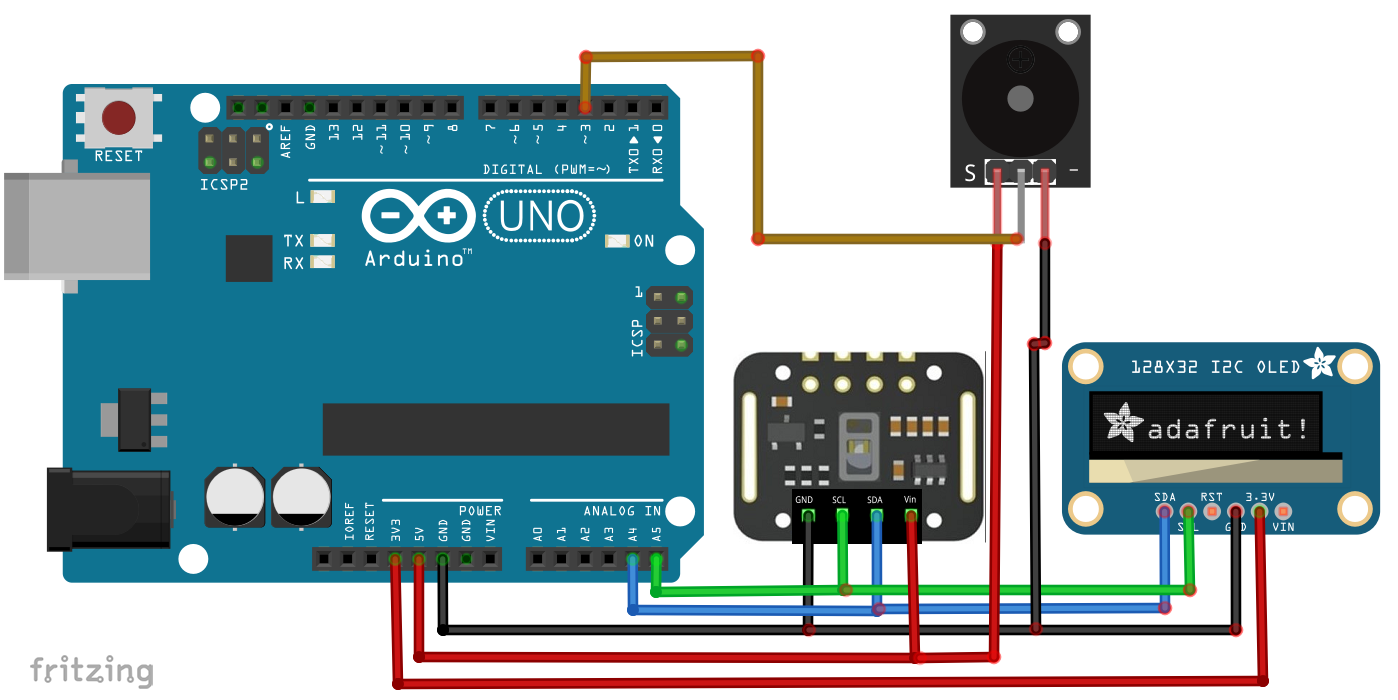
Beide modules hebben I²C interface. Buzzer (2-pin): (-) → GND, (+) met weerstand → D3.
Productieproces
- Geïntegreerde QR, RFID en Temperatuurverificatie Toegangscontrolesysteem
- Meerdere DS18B20 1-Wire Sensoren Aan Een Raspberry Pi Koppelen Voor Nauwkeurige Temperatuurmonitoring
- Een geautomatiseerd aeroponisch systeem bouwen met Raspberry Pi en vochtigheidssensor
- Remote Hartslagmonitoringssysteem met AWS IoT-waarschuwingen
- Een Robot Bouwen met Raspberry Pi en Python: Een Complete Gids
- Integreren van een thermocouple-sensor met de Arduino Portenta H7 via de MAX6675 IC
- Bouw een real-time gyroscoop-spel met Arduino Nano & MPU-6050 sensor
- Real-time IoT hartslagmonitor met Arduino en MAX30100
- Bouw een nauwkeurige hartslagmonitor met een fotoweerstand en Arduino
- Koper Elektrolyseren Project: Bouw een Slim Systeem met Arduino UNO
- Werkplaatsruimte Maximaliseren Met Visual Components, Matterport & ProFeeder X Automatisering