



Geavanceerde GPS Data Logger: Realtime Vlucht Tracking, Piekhoogte & Snelheidsmonitoring
Onderdelen en benodigdheden
| Onderdeel | Aantal |
|---|---|
| Arduino UNO | 1 |
| Jumper (Busbar), Jumper Leads Set | 1 |
| Arduino Proto Shield | 1 |
| 1.8" TFT SPI LCD-scherm met MicroSD-sleuf | 1 |
| u-blox GPS NEO 6M | 1 |
Benodigde tools en machines
- Solderbout (standaard)
- Solderdraad, loodvrij
- Kabelstripper & Knipper, 18-10 AWG / 0.75-4mm²
Over dit project
Inleiding
Ik beoefen aeromodellering en wil graag de snelheid en hoogte van mijn vliegtuigjes weten. Helaas zijn commerciële GPS-data loggers erg duur.
Daarom besloot ik een GPS-data logger te bouwen op basis van Arduino voor minder dan €50.
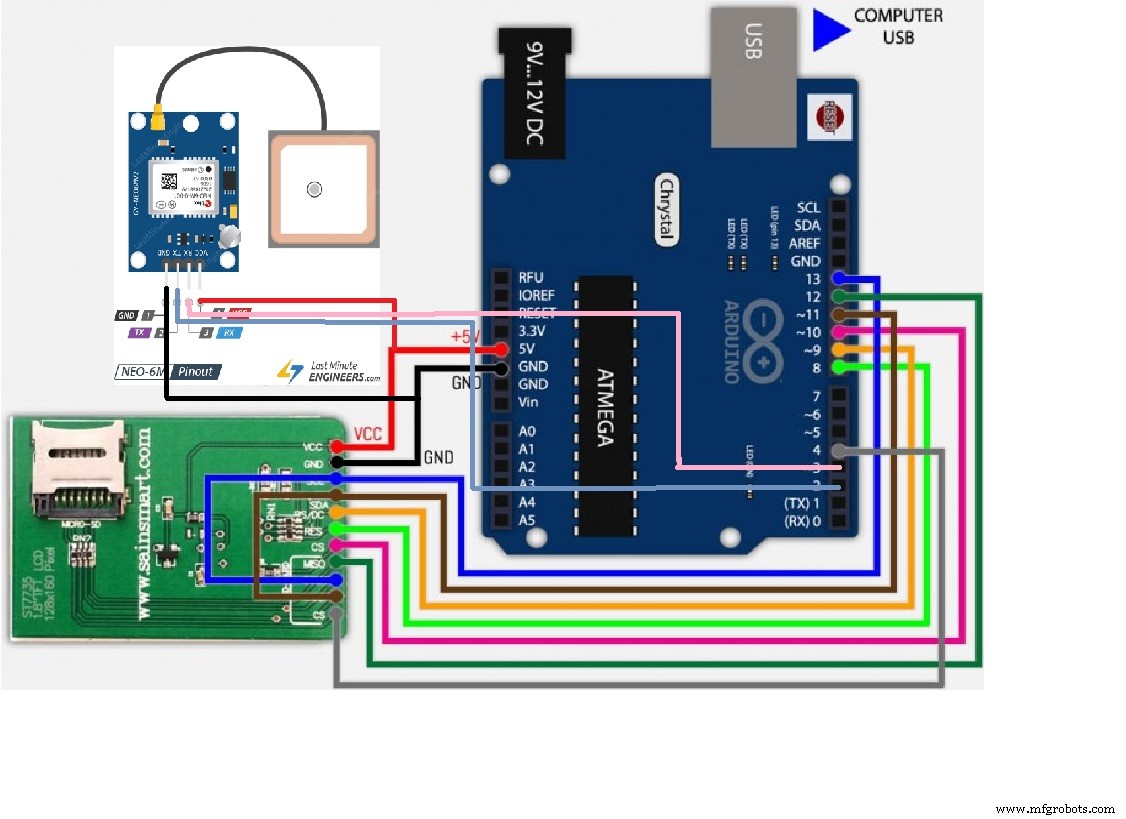
Mijn eerste prototype is gebaseerd op een Arduino Uno R3 met een Sainsmart ST7735-scherm met geïntegreerde SD-kaart en een NEO 6M V2 GPS-module.
In het tweede project ga ik een Arduino Nano gebruiken met een SSD1306 OLED-scherm, dezelfde GPS-module en een micro-SD-kaart. Het gewicht met behuizing zou rond de 40 gram moeten zijn en kan gemakkelijk in een middelgroot vliegtuig geïntegreerd worden (afmetingen L 50 mm x B 30 mm x H 22 mm).
Dit zal mijn volgende project zijn (ik wacht nog op het materiaal).
Test
Het is niet makkelijk om een Arduino-scherm in een auto te filmen, maar ik heb het gedaan en je kunt het resultaat in de video zien.
De volgende test zal met de nieuwe, kleinere en lichtere prototype op een radiogestuurd vliegtuig plaatsvinden. Nog te volgen!
Code
GPS Data Logger (Arduino)
#include <SPI.h>
#include <Adafruit_GFX.h>
#include <Adafruit_ST7735.h>
#define cs 10
#define dc 9
#define rst 8
#include <TinyGPS++.h>
#include <SoftwareSerial.h>

Adafruit_ST7735 tft = Adafruit_ST7735(cs, dc, rst);
static const int RXPin = 4, TXPin = 3; // GPS-communicatie
static const uint32_t GPSBaud = 9600;
#define OLED_RESET 5

TinyGPSPlus gps;
SoftwareSerial ss(RXPin, TXPin);

int x = 80;
int xh = 80;
int maxhigh = 0;
int maxspeed = 0, speed1 = 0;
int high1 = 0;

void setup() {
  Serial.begin(9600);
  ss.begin(GPSBaud);
  tft.initR(INITR_GREENTAB);
  tft.fillScreen(ST7735_BLACK);
  tft.setCursor(5, 58);
  tft.setTextSize(1);
  tft.setTextColor(ST7735_GREEN, ST7735_BLACK);
  tft.print("initialisatie");
}

void loop() {
  tft.setTextSize(1);
  tft.setTextColor(ST7735_GREEN, ST7735_BLACK);

  while (ss.available() > 0) {
    gps.encode(ss.read());
    if (gps.location.isUpdated()) {
      cadre();

      // Breedtegraad
      tft.setCursor(5, 44);
      tft.setTextColor(ST7735_GREEN, ST7735_BLACK);
      tft.print("Breedtegraad: ");
      tft.setTextColor(ST7735_CYAN, ST7735_BLACK);
      tft.print(gps.location.lat(), 6);

      // Lengtegraad
      tft.setCursor(5, 58);
      tft.setTextColor(ST7735_GREEN, ST7735_BLACK);
      tft.print("Lengtegraad: ");
      tft.setTextColor(ST7735_CYAN, ST7735_BLACK);
      tft.print(gps.location.lng(), 6);

      // Datum
      tft.setCursor(5, 7);
      tft.setTextColor(ST7735_GREEN, ST7735_BLACK);
      tft.print("datum: ");
      tft.setTextColor(ST7735_CYAN, ST7735_BLACK);
      tft.print(gps.date.day());
      tft.print(" ");
      tft.print(gps.date.month());
      tft.print(" ");
      tft.print(gps.date.year());

      // Tijd
      tft.setCursor(5, 20);
      tft.setTextColor(ST7735_GREEN, ST7735_BLACK);
      tft.print("tijd: ");
      tft.setTextColor(ST7735_CYAN, ST7735_BLACK);
      tft.print(gps.time.hour() + 1);
      tft.print(" ");
      tft.print(gps.time.minute());
      tft.print(" ");
      tft.print(gps.time.second());
      tft.print(" ");

      // Hoogte
      tft.setCursor(3, 30);
      tft.setCursor(5, 80);
      tft.print("H m: ");
      tft.setTextColor(ST7735_CYAN, ST7735_BLACK);
      tft.print(gps.altitude.meters(), 0);
      tft.setTextColor(ST7735_CYAN, ST7735_BLACK);
      tft.print(" ");
      tft.setTextColor(ST7735_GREEN, ST7735_BLACK);
      tft.setCursor(5, 95);
      hmax();
      tft.print("Hmax: ");
      tft.setTextColor(ST7735_CYAN, ST7735_BLACK);
      tft.print(maxhigh);
      tft.setTextColor(ST7735_CYAN, ST7735_BLACK);
      tft.print(" ");
      courbeh();

      // Snelheid
      tft.setCursor(5, 115);
      tft.setTextColor(ST7735_GREEN, ST7735_BLACK);
      tft.print("V act: ");
      tft.setTextColor(ST7735_CYAN, ST7735_BLACK);
      tft.print(gps.speed.kmph(), 0);
      tft.setTextColor(ST7735_CYAN, ST7735_BLACK);
      tft.print(" ");
      tft.setCursor(5, 130);
      tft.setTextColor(ST7735_GREEN, ST7735_BLACK);
      vmax();
      tft.print("vmax: ");
      tft.setTextColor(ST7735_CYAN, ST7735_BLACK);
      tft.print(maxspeed);
      tft.setTextColor(ST7735_CYAN, ST7735_BLACK);
      tft.print(" ");
      tft.setTextColor(ST7735_GREEN, ST7735_BLACK);
      courbe();

      // Aantal satellieten
      tft.setCursor(5, 147);
      tft.setTextColor(ST7735_GREEN, ST7735_BLACK);
      tft.print("aantal Sat: ");
      tft.setTextColor(ST7735_CYAN, ST7735_BLACK);
      tft.print(gps.satellites.value());
      tft.setTextColor(ST7735_CYAN, ST7735_BLACK);
      tft.print(" ");

      // HDOP
      Serial.print("HDOP = ");
      Serial.println(gps.hdop.value());

      smartDelay(400);
    }
  }
}

static void smartDelay(unsigned long ms) {
  unsigned long start = millis();
  do {
    while (ss.available()) gps.encode(ss.read());
  } while (millis() - start < ms);
}

void cadre() {
  // Schermkader tekenen
  tft.drawLine(0, 0, 130, 0, ST7735_RED);
  tft.drawLine(0, 1, 130, 1, ST7735_RED);
  tft.drawLine(0, 158, 130, 158, ST7735_RED);
  tft.drawLine(0, 142, 130, 142, ST7735_RED);
  tft.drawLine(0, 141, 130, 141, ST7735_RED);
  tft.drawLine(0, 107, 130, 107, ST7735_RED);
  tft.drawLine(0, 108, 130, 108, ST7735_RED);
  tft.drawLine(80, 108, 80, 140, ST7735_RED);
  tft.drawLine(81, 109, 81, 140, ST7735_RED);
  tft.drawLine(80, 70, 80, 108, ST7735_RED);
  tft.drawLine(81, 70, 81, 108, ST7735_RED);
  tft.drawLine(0, 159, 130, 159, ST7735_RED);
  tft.drawLine(0, 0, 0, 156, ST7735_RED);
  tft.drawLine(1, 1, 1, 157, ST7735_RED);
  tft.drawLine(127, 0, 127, 156, ST7735_RED);
  tft.drawLine(126, 0, 126, 156, ST7735_RED);
  tft.drawLine(0, 35, 130, 35, ST7735_RED);
  tft.drawLine(0, 36, 130, 36, ST7735_RED);
  tft.drawLine(0, 70, 130, 70, ST7735_RED);
  tft.drawLine(0, 71, 130, 71, ST7735_RED);
}

void courbe() {
  int nieuweValeur;
  // Conversie max snelheid (150 km/u) naar pixel
  nieuweValeur = map(gps.speed.kmph(), 0, 150, 137, 110);
  x++;
  tft.drawPixel(x, nieuweValeur, ST7735_CYAN);
  if (x > 123) {
    x = 80;
    tft.fillRect(82, 110, 43, 30, ST7735_BLACK);
  }
}

void courbeh() {
  int nouvelleValeurh;
  // Conversie max hoogte (1000 m) naar pixel
  nouvelleValeurh = map(gps.altitude.meters(), 0, 1000, 104, 72);
  xh++;
  tft.drawPixel(xh, nouvelleValeurh, ST7735_CYAN);
  if (xh > 123) {
    xh = 80;
    tft.fillRect(82, 72, 43, 35, ST7735_BLACK);
  }
}

void vmax() {
  // Bereken maximum snelheid
  speed1 = gps.speed.kmph();
  if (speed1 > maxspeed) {
    maxspeed = speed1;
  }
}

void hmax() {
  // Bereken maximum hoogte
  high1 = gps.altitude.meters();
  if (high1 > maxhigh) {
    maxhigh = high1;
  }
}
SD-kaart Data Logging (Arduino)
#include <SPI.h>
#include <SD.h>
#include <Adafruit_GFX.h>
#include <Adafruit_ST7735.h>
#define cs 10
#define dc 9
#define rst 8
#include <TinyGPS++.h>
#include <SoftwareSerial.h>

Adafruit_ST7735 tft = Adafruit_ST7735(cs, dc, rst);
static const int RXPin = 4, TXPin = 3;
static const uint32_t GPSBaud = 9600;
const int cs_sd = 4;
#define OLED_RESET 5

TinyGPSPlus gps;
SoftwareSerial ss(RXPin, TXPin);

int x = 80;
int xh = 80;
int maxhigh = 0;
int maxspeed = 0, speed1 = 0;
int high1 = 0;

void setup() {
  Serial.begin(9600);
  ss.begin(GPSBaud);
  tft.initR(INITR_GREENTAB);
  tft.fillScreen(ST7735_BLACK);
  tft.setCursor(5, 58);
  tft.setTextSize(1);
  tft.setTextColor(ST7735_GREEN, ST7735_BLACK);
  tft.print("initialisatie");
  tft.setCursor(5, 70);
  tft.print("init SD");
  delay(1000);

  if (!SD.begin(cs_sd)) {
    tft.setCursor(5, 82);
    tft.print("SD-fout");
    return;
  }
  tft.setCursor(5, 82);
  tft.print("SD-kaart OK");
  delay(1000);
  tft.fillScreen(ST7735_BLACK);

  File data = SD.open("data.txt", FILE_WRITE);
  data.println("");
  data.println("Start acquisitie");
  data.close();
}

void loop() {
  tft.setTextSize(1);
  tft.setTextColor(ST7735_GREEN, ST7735_BLACK);

  while (ss.available() > 0) {
    gps.encode(ss.read());
    if (gps.location.isUpdated()) {
      cadre();

      // Breedtegraad
      tft.setCursor(5, 44);
      tft.setTextColor(ST7735_GREEN, ST7735_BLACK);
      tft.print("Breedtegraad: ");
      tft.setTextColor(ST7735_CYAN, ST7735_BLACK);
      tft.print(gps.location.lat(), 6);

      // Lengtegraad
      tft.setCursor(5, 58);
      tft.setTextColor(ST7735_GREEN, ST7735_BLACK);
      tft.print("Lengtegraad: ");
      tft.setTextColor(ST7735_CYAN, ST7735_BLACK);
      tft.print(gps.location.lng(), 6);

      // Datum
      tft.setCursor(5, 7);
      tft.setTextColor(ST7735_GREEN, ST7735_BLACK);
      tft.print("datum: ");
      tft.setTextColor(ST7735_CYAN, ST7735_BLACK);
      tft.print(gps.date.day());
      tft.print(" ");
      tft.print(gps.date.month());
      tft.print(" ");
      tft.print(gps.date.year());
      String Date = String(gps.date.day()) + " " + String(gps.date.month()) + " " + String(gps.date.year());

      // Tijd
      tft.setCursor(5, 20);
      tft.setTextColor(ST7735_GREEN, ST7735_BLACK);
      tft.print("tijd: ");
      tft.setTextColor(ST7735_CYAN, ST7735_BLACK);
      tft.print(gps.time.hour() + 1);
      tft.print(" ");
      tft.print(gps.time.minute());
      tft.print(" ");
      tft.print(gps.time.second());
      tft.print(" ");
      tft.setTextColor(ST7735_GREEN, ST7735_BLACK);
      tft.setCursor(3, 30);
      String Time = String(gps.time.hour() + 1) + " " + String(gps.time.minute()) + " " + String(gps.time.second());

      // Hoogte
      tft.setCursor(5, 80);
      tft.print("H m: ");
      tft.setTextColor(ST7735_CYAN, ST7735_BLACK);
      tft.print(gps.altitude.meters(), 0);
      tft.setTextColor(ST7735_CYAN, ST7735_BLACK);
      tft.print(" ");
      tft.setTextColor(ST7735_GREEN, ST7735_BLACK);
      tft.setCursor(5, 95);
      hmax();
      tft.print("Hmax: ");
      tft.setTextColor(ST7735_CYAN, ST7735_BLACK);
      tft.print(maxhigh);
      tft.setTextColor(ST7735_CYAN, ST7735_BLACK);
      tft.print(" ");
      courbeh();

      // Snelheid
      tft.setCursor(5, 115);
      tft.setTextColor(ST7735_GREEN, ST7735_BLACK);
      tft.print("V act: ");
      tft.setTextColor(ST7735_CYAN, ST7735_BLACK);
      tft.print(gps.speed.kmph(), 0);
      tft.setTextColor(ST7735_CYAN, ST7735_BLACK);
      tft.print(" ");
      tft.setCursor(5, 130);
      tft.setTextColor(ST7735_GREEN, ST7735_BLACK);
      vmax();
      tft.print("vmax: ");
      tft.setTextColor(ST7735_CYAN, ST7735_BLACK);
      tft.print(maxspeed);
      tft.setTextColor(ST7735_CYAN, ST7735_BLACK);
      tft.print(" ");
      tft.setTextColor(ST7735_GREEN, ST7735_BLACK);
      courbe();

      // Satellieten
      tft.setCursor(5, 147);
      tft.setTextColor(ST7735_GREEN, ST7735_BLACK);
      tft.print("aantal Sat: ");
      tft.setTextColor(ST7735_CYAN, ST7735_BLACK);
      tft.print(gps.satellites.value());
      tft.setTextColor(ST7735_CYAN, ST7735_BLACK);
      tft.print(" ");

      Serial.print("HDOP = ");
      Serial.println(gps.hdop.value());

      smartDelay(400);

      // Data naar SD-kaart schrijven
      File data = SD.open("data.txt", FILE_WRITE);
      data.println(Date + " " + Time + " " + String(gps.location.lat(), 6) + " " + String(gps.location.lng(), 6) + " " + String(gps.altitude.meters(), 0) + " " + String(maxhigh) + " " + String(gps.speed.kmph(), 0) + " " + String(maxspeed));
      data.close();
    }
  }
}

static void smartDelay(unsigned long ms) {
  unsigned long start = millis();
  do {
    while (ss.available()) gps.encode(ss.read());
  } while (millis() - start < ms);
}

void cadre() {
  // Schermkader tekenen (identiek aan vorige versie)
  tft.drawLine(0, 0, 130, 0, ST7735_RED);
  tft.drawLine(0, 1, 130, 1, ST7735_RED);
  tft.drawLine(0, 158, 130, 158, ST7735_RED);
  tft.drawLine(0, 142, 130, 142, ST7735_RED);
  tft.drawLine(0, 141, 130, 141, ST7735_RED);
  tft.drawLine(0, 107, 130, 107, ST7735_RED);
  tft.drawLine(0, 108, 130, 108, ST7735_RED);
  tft.drawLine(80, 108, 80, 140, ST7735_RED);
  tft.drawLine(81, 109, 81, 140, ST7735_RED);
  tft.drawLine(80, 70, 80, 108, ST7735_RED);
  tft.drawLine(81, 70, 81, 108, ST7735_RED);
  tft.drawLine(0, 159, 130, 159, ST7735_RED);
  tft.drawLine(0, 0, 0, 156, ST7735_RED);
  tft.drawLine(1, 1, 1, 157, ST7735_RED);
  tft.drawLine(127, 0, 127, 156, ST7735_RED);
  tft.drawLine(126, 0, 126, 156, ST7735_RED);
  tft.drawLine(0, 35, 130, 35, ST7735_RED);
  tft.drawLine(0, 36, 130, 36, ST7735_RED);
  tft.drawLine(0, 70, 130, 70, ST7735_RED);
  tft.drawLine(0, 71, 130, 71, ST7735_RED);
}

void courbe() {
  int nieuweValeur;
  nieuweValeur = map(gps.speed.kmph(), 0, 150, 137, 110);
  x++;
  tft.drawPixel(x, nieuweValeur, ST7735_CYAN);
  if (x > 123) {
    x = 80;
    tft.fillRect(82, 110, 43, 30, ST7735_BLACK);
  }
}

void courbeh() {
  int nouvelleValeurh;
  nouvelleValeurh = map(gps.altitude.meters(), 0, 1000, 104, 72);
  xh++;
  tft.drawPixel(xh, nouvelleValeurh, ST7735_CYAN);
  if (xh > 123) {
    xh = 80;
    tft.fillRect(82, 72, 43, 35, ST7735_BLACK);
  }
}

void vmax() {
  speed1 = gps.speed.kmph();
  if (speed1 > maxspeed) maxspeed = speed1;
}

void hmax() {
  high1 = gps.altitude.meters();
  if (high1 > maxhigh) maxhigh = high1;
}
Schema's
Productieproces
- Een Snel, Betrouwbare Brandsdetectiesysteem Bouwen met Samsung SAMIIO, Arduino UNO & Raspberry Pi
- Real-time zonnepaneelmonitoring met Arduino: Goedkope data-acquisitie
- Bouw een Betrouwbare Arduino Energiemonitor & Datalogger – Stapsgewijze Handleiding
- Bouw Boeiende LCD Animaties & Games met Arduino UNO
- Arduino temperatuur- en vochtigheidslogger met DHT11 en Ethernet Shield
- Bouw een eenvoudige rekenmachine met Arduino UNO – Makkelijk project
- Een draagbaar Persistence-of-Vision-display bouwen met Arduino UNO en ATtiny85
- u-blox LEA‑6H GPS Module: Arduino & Python Integratie Handleiding
- Bouw een 4x4x4 LED-kubus met Arduino Uno & 1Sheeld – Interactief LED-project
- Python 3 naar Arduino UNO: Eenvoudige Commando Besturing en LED Demo
- Bouw een compacte FM-radio met Arduino Nano en RDA5807M