



Arduino Audio Frequentie Detector – Meet de luidste geluidspieken met hoge gevoeligheid
Onderdelen en benodigdheden
- 1x Arduino UNO
- 1x DEVMO Hoge Gevoeligheids Geluidsdetectie Module voor Arduino
- 1x Solderloos Breadboard (volledige formaat)
- 1x Computer
- 1x USB-A naar B Kabel
- 1x Set jumper wires
Over dit project
Deze Arduino-project toont de benaderende frequentie van het luidste gedetecteerde geluid door een geluidsdetectiemodule. De analoge uitgang van de module stuurt het gedetecteerde audiosignaal naar A0 van de Arduino Uno. Het analoge signaal wordt bemonsterd en gekwantiseerd (gedigitaliseerd). Vervolgens wordt een Fast Fourier Transform (FFT) uitgevoerd op de gedigitaliseerde data. De FFT converteert de digitale data van het benaderende discrete-tijddomein. De maximum frequentie van dit resultaat wordt bepaald en weergegeven via de Arduino IDE Serial Monitor.
Voor meer informatie over dit project, bezoek: More Information
Zie mijn opvolgproject: [deze link]
Code
AudioFrequencyDetectorV1-0.ino
/* File/Sketch Name: AudioFrequencyDetector Version No.: v1.0 Created 12 December, 2019 Original Author: Clyde A. Lettsome, PhD, PE, MEM Description: This code/sketch makes displays the approximate frequency of the loudest sound detected by a sound detection module. For this project, the analog output from the sound module detector sends the analog audio signal detected to A0 of the Arduino Uno. The analog signal is sampled and quantized (digitized). A Fast Fourier Transform (FFT) is then performed on the digitized data. The FFT converts the digital data from the approximate discrete-time domain result. The maximum frequency of the approximate discrete-time domain result is then determined and displayed via the Arduino IDE Serial Monitor. Note: The arduinoFFT.h library needs to be added to the Arduino IDE before compiling and uploading this script/sketch to an Arduino. License: This program is free software; you can redistribute it and/or modify it under the terms of the GNU General Public License (GPL) version 3, or any later version of your choice, as published by the Free Software Foundation. Notes: Copyright (c) 2019 by C. A. Lettsome Services, LLC For more information visit https://clydelettsome.com/blog/2019/12/18/my-weekend-project-audio-frequency-detector-using-an-arduino/ */
#include "arduinoFFT.h"
#define SAMPLES 128 //SAMPLES-pt FFT. Must be a base 2 number. Max 128 for Arduino Uno.
#define SAMPLING_FREQUENCY 2048 //Ts = Based on Nyquist, must be 2 times the highest expected frequency.
arduinoFFT FFT = arduinoFFT();
unsigned int samplingPeriod;
unsigned long microSeconds;
double vReal[SAMPLES]; //create vector of size SAMPLES to hold real values
double vImag[SAMPLES]; //create vector of size SAMPLES to hold imaginary values
void setup() {
  Serial.begin(115200); //Baud rate for the Serial Monitor
  samplingPeriod = round(1000000*(1.0/SAMPLING_FREQUENCY)); //Period in microseconds
}
void loop() {
  /*Sample SAMPLES times*/
  for(int i=0; i<SAMPLES; i++) {
    microSeconds = micros(); //Returns the number of microseconds since the Arduino board began running the current script.
    vReal[i] = analogRead(0); //Reads the value from analog pin 0 (A0), quantize it and save it as a real term.
    vImag[i] = 0; //Makes imaginary term 0 always
    /*remaining wait time between samples if necessary*/
    while(micros() < (microSeconds + samplingPeriod)) {
      //do nothing
    }
  }
  /*Perform FFT on samples*/
  FFT.Windowing(vReal, SAMPLES, FFT_WIN_TYP_HAMMING, FFT_FORWARD);
  FFT.Compute(vReal, vImag, SAMPLES, FFT_FORWARD);
  FFT.ComplexToMagnitude(vReal, vImag, SAMPLES);
  /*Find peak frequency and print peak*/
  double peak = FFT.MajorPeak(vReal, SAMPLES, SAMPLING_FREQUENCY);
  Serial.println(peak); //Print out the most dominant frequency.
  /*Script stops here. Hardware reset required.*/
  while (1); //do one time
}
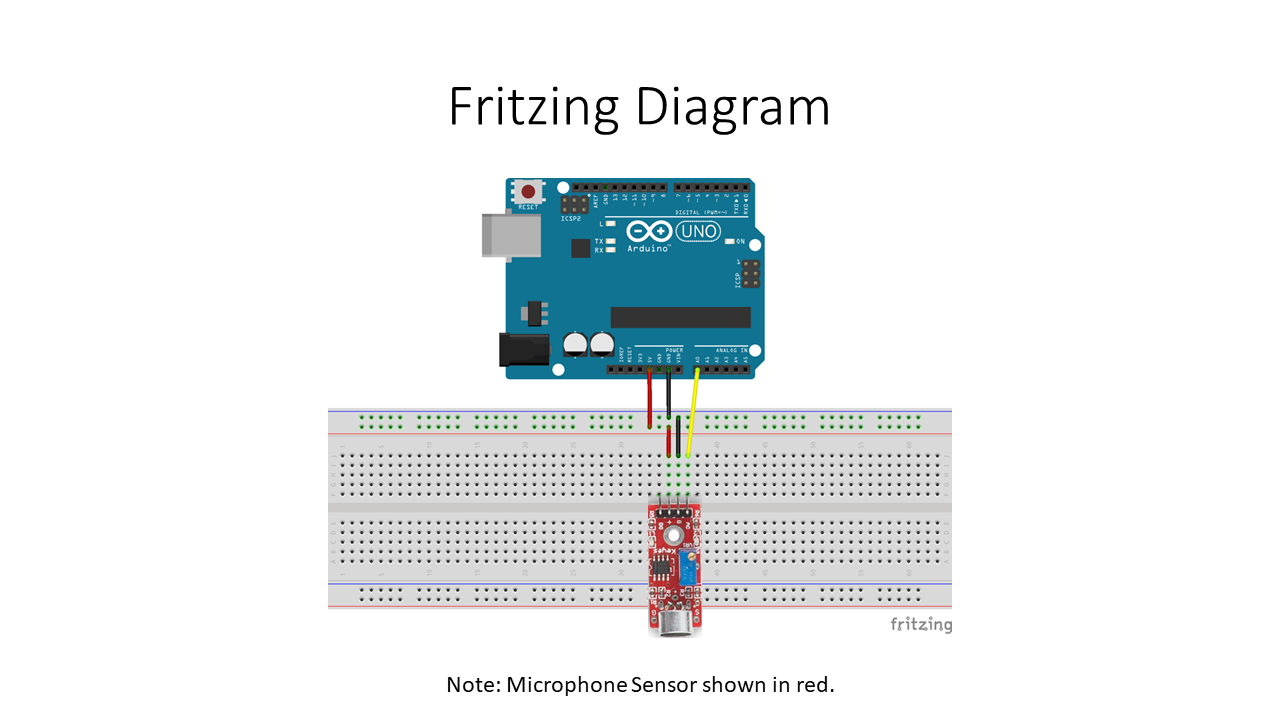
Schema
Deze Arduino-project toont de benaderende frequentie van het luidste gedetecteerde geluid door een geluidsdetectiemodule.
Productieproces
- Bouw een indrukwekkend monitor Ambilight-systeem met Arduino
- Bouw een Klassiek Pong-spel op Arduino UNO met OLED-display – Stap-voor-stap Tutorial
- Bouw Je Eigen Arduino Tamagotchi: Een Digitale Huisdier DIY Project
- Audio afspelen met Arduino UNO en DFPlayer Mini – Stap-voor-stap handleiding
- Slimme Draadloze Lichtschakelaar Controller: Arduino-gebaseerde Remote Switch Manipulator
- Arduino Boter-Kaas-Eieren met MAX7219 LED Matrix en Kartonnen Behuizing
- Slimme beweegactiverde waterpistool gebouwd met Arduino Nano
- Bouw een Betrouwbare Arduino Afteltimer met SparkFun 7‑Segment Display
- Arduino Zonnebloem: Bouw een elektronische zon-volgende zonnebloem
- Bouw je eigen RC Porsche-auto met Arduino: Stap-voor-stap handleiding
- Maak Muzikale Tonen met Arduino: Stapsgewijze Handleiding