×
1
MyOctopus i2c Barometrische Luchtdruk Sensor BMP280
×
1
×
1
×
1
×
1
Dit apparaat bestaat uit twee onafhankelijke modules in één behuizing.
Een is de Arduino barometer met de BMP180 sensor, die een rapport bevat van realtime, -1u en -3u verschil in luchtverontreiniging. Deze rapporten zijn met name nuttig in de korte termijn lokale weersvoorspelling. De code is afkomstig van de "shelvin.de" website, waarin het verschil tussen de absolute en de relatieve luchtdruk voor de gegeven hoogte in de "druck_offset=" regel in de code is ingevoerd. De resultaten worden gepresenteerd op het N5110 LCD-scherm, dat ook de interne temperatuur toont.
Het volgende apparaat wordt aangedreven door een ESP8266-bord dat een 0,96 inch OLED-display verbindt. De ESP8266 is via Wi-Fi-netwerk verbonden met de "openweathermap" pagina, waarvandaan het een drie-daagse weersvoorspelling haalt en presenteert op het OLED-display. Hiervoor heeft u een API-sleutel in de code nodig, die verkregen wordt van de Openweathermap-pagina. Volledige gedetailleerde instructies voor het installeren van bibliotheken en code op esp8266 zijn gegeven op:
https://blog.squix.org/wp-content/uploads/2017/06/esp8266weatherstationgettingstartedguide-20170608.pdf
In dit specifieke geval gebruik ik het NodeMCU 1.0 (ESP12E module) bord.
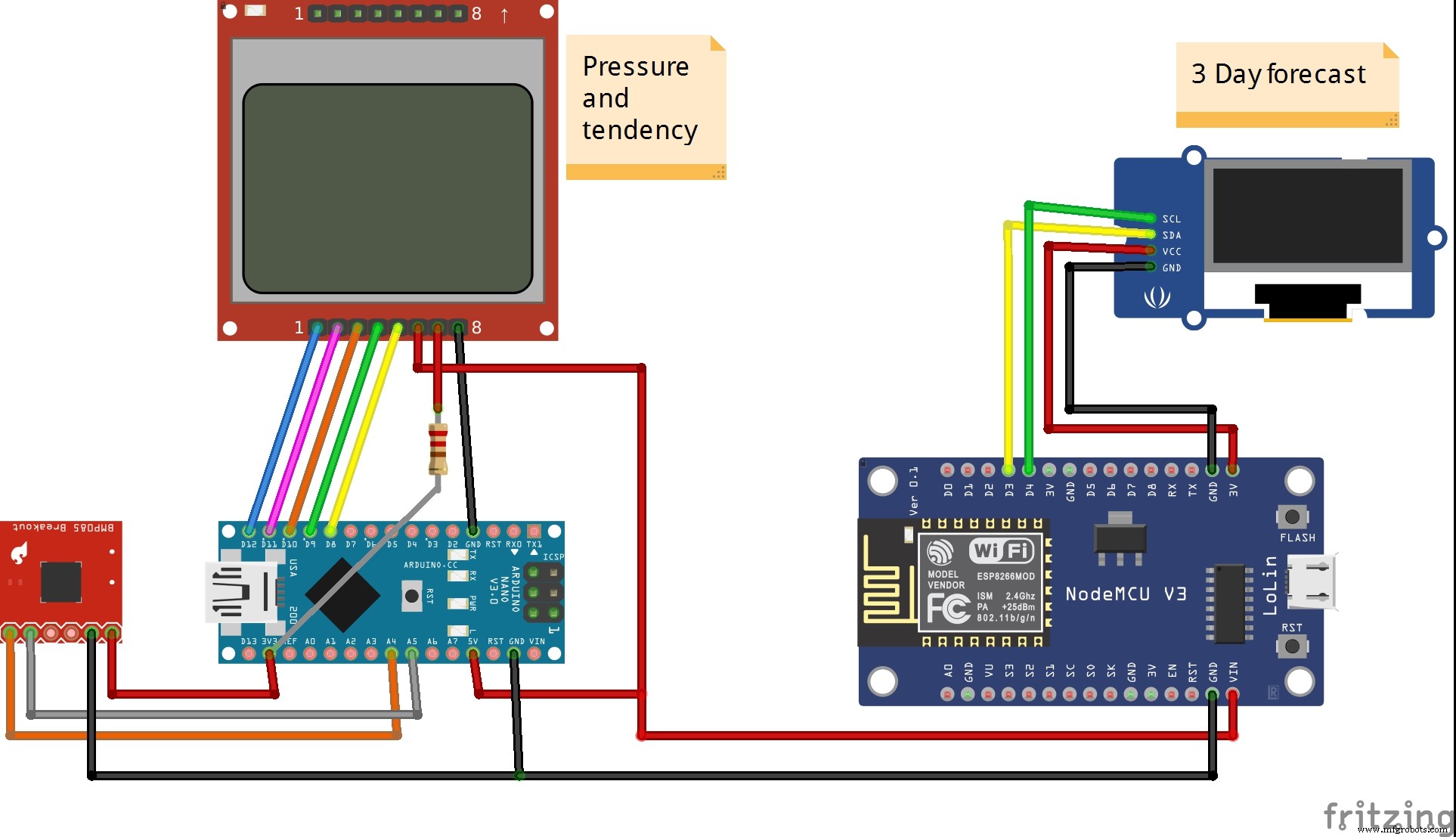
De afbeelding hieronder toont het schema van het complete apparaat.
Ontitelde bestandArduino
// Luchtdruk Uitvoer huidig
// Luchtdrukdifferentiel wordt met 1 en 3 uur eerder (in EEPROM) vergeleken en uitgegeven
// Temperatuur Uitvoer huidig
//
// Onderdelen:
// LCD Display van Nokia 5110
// BMP180 Luchtdruksensor
// Arduino Uno
//
// Matthias Busse Versie 1.0 van 21.9.2014
#include < Wire.h>
#include < avr/sleep.h>
#include < EEPROM.h>
// EEPROM Variabelen
int eepromAdresse=0, eepromMax=1023; // 1024 EEPROM Opslagplaatsen, 0-1023
int eepromOldAdr, eepromDif1=60, eepromDif3=180; // 60/180 Opslagplaatsen (Minuten) terug vergelijken
// BMP180 Variabelen
#define I2C_ADDRESS 0x77
const unsigned char oversampling_setting = 3; //oversamplig: 0 onnauwkeurig (13ms) ... 3 nauwkeurig (34ms)
const unsigned char pressure_waittime[4] = { 5, 8, 14, 26 }; // lt. Datenblatt BMP-180
int ac1, ac2, ac3, b1, b2, mb, mc, md;
unsigned int ac4, ac5, ac6;
int temp = 20, temp_mittel=200, test=0;
long druck = 1013, druck_mittel=101300;
float t, temp_offset=0.0, d, dAlt, dDiff, druck_offset=2.0;
int zeitabgl=0, mitteln=5;
char tstring[5], dstring[7];
// Power Down Variabelen
volatile int sleepcounter = 0; // Slaapcycli tellen
// Display Variabelen
static const byte ASCII[][5] = {// ASCII Tabel met Fonts
{0x00, 0x00, 0x00, 0x00, 0x00} // 20
,{0x00, 0x00, 0x5f, 0x00, 0x00} // 21 !
,{0x00, 0x07, 0x00, 0x07, 0x00} // 22 "
,{0x14, 0x7f, 0x14, 0x7f, 0x14} // 23 #
,{0x24, 0x2a, 0x7f, 0x2a, 0x12} // 24 $
,{0x23, 0x13, 0x08, 0x64, 0x62} // 25 %
,{0x36, 0x49, 0x55, 0x22, 0x50} // 26 &
,{0x00, 0x05, 0x03, 0x00, 0x00} // 27 '
,{0x00, 0x1c, 0x22, 0x41, 0x00} // 28 (
,{0x00, 0x41, 0x22, 0x1c, 0x00} // 29 )
,{0x14, 0x08, 0x3e, 0x08, 0x14} // 2a *
,{0x08, 0x08, 0x3e, 0x08, 0x08} // 2b +
,{0x00, 0x50, 0x30, 0x00, 0x00} // 2c ,
,{0x08, 0x08, 0x08, 0x08, 0x08} // 2d -
,{0x00, 0x60, 0x60, 0x00, 0x00} // 2e .
,{0x20, 0x10, 0x08, 0x04, 0x02} // 2f /
,{0x3e, 0x51, 0x49, 0x45, 0x3e} // 30 0
,{0x00, 0x42, 0x7f, 0x40, 0x00} // 31 1
,{0x42, 0x61, 0x51, 0x49, 0x46} // 32 2
,{0x21, 0x41, 0x45, 0x4b, 0x31} // 33 3
,{0x18, 0x14, 0x12, 0x7f, 0x10} // 34 4
,{0x27, 0x45, 0x45, 0x45, 0x39} // 35 5
,{0x3c, 0x4a, 0x49, 0x49, 0x30} // 36 6
,{0x01, 0x71, 0x09, 0x05, 0x03} // 37 7
,{0x36, 0x49, 0x49, 0x49, 0x36} // 38 8
,{0x06, 0x49, 0x49, 0x29, 0x1e} // 39 9
,{0x00, 0x36, 0x36, 0x00, 0x00} // 3a :
,{0x00, 0x56, 0x36, 0x00, 0x00} // 3b ;
,{0x08, 0x14, 0x22, 0x41, 0x00} // 3c <
,{0x14, 0x14, 0x14, 0x14, 0x14} // 3d =
,{0x00, 0x41, 0x22, 0x14, 0x08} // 3e >
,{0x02, 0x01, 0x51, 0x09, 0x06} // 3f ?
,{0x32, 0x49, 0x79, 0x41, 0x3e} // 40 @
,{0x7e, 0x11, 0x11, 0x11, 0x7e} // 41 A
,{0x7f, 0x49, 0x49, 0x49, 0x36} // 42 B
,{0x3e, 0x41, 0x41, 0x41, 0x22} // 43 C
,{0x7f, 0x41, 0x41, 0x22, 0x1c} // 44 D
,{0x7f, 0x49, 0x49, 0x49, 0x41} // 45 E
,{0x7f, 0x09, 0x09, 0x09, 0x01} // 46 F
,{0x3e, 0x41, 0x49, 0x49, 0x7a} // 47 G
,{0x7f, 0x08, 0x08, 0x08, 0x7f} // 48 H
,{0x00, 0x41, 0x7f, 0x41, 0x00} // 49 I
,{0x20, 0x40, 0x41, 0x3f, 0x01} // 4a J
,{0x7f, 0x08, 0x14, 0x22, 0x41} // 4b K
,{0x7f, 0x40, 0x40, 0x40, 0x40} // 4c L
,{0x7f, 0x02, 0x0c, 0x02, 0x7f} // 4d M
,{0x7f, 0x04, 0x08, 0x10, 0x7f} // 4e N
,{0x3e, 0x41, 0x41, 0x41, 0x3e} // 4f O
,{0x7f, 0x09, 0x09, 0x09, 0x06} // 50 P
,{0x3e, 0x41, 0x51, 0x21, 0x5e} // 51 Q
,{0x7f, 0x09, 0x19, 0x29, 0x46} // 52 R
,{0x46, 0x49, 0x49, 0x49, 0x31} // 53 S
,{0x01, 0x01, 0x7f, 0x01, 0x01} // 54 T
,{0x3f, 0x40, 0x40, 0x40, 0x3f} // 55 U
,{0x1f, 0x20, 0x40, 0x20, 0x1f} // 56 V
,{0x3f, 0x40, 0x38, 0x40, 0x3f} // 57 W
,{0x63, 0x14, 0x08, 0x14, 0x63} // 58 X
,{0x07, 0x08, 0x70, 0x08, 0x07} // 59 Y
,{0x61, 0x51, 0x49, 0x45, 0x43} // 5a Z
,{0x00, 0x7f, 0x41, 0x41, 0x00} // 5b [
,{0x02, 0x04, 0x08, 0x10, 0x20} // 5c ?
,{0x00, 0x41, 0x41, 0x7f, 0x00} // 5d ]
,{0x04, 0x02, 0x01, 0x02, 0x04} // 5e ^
,{0x40, 0x40, 0x40, 0x40, 0x40} // 5f _
,{0x00, 0x01, 0x02, 0x04, 0x00} // 60 `
,{0x20, 0x54, 0x54, 0x54, 0x78} // 61 a
,{0x7f, 0x48, 0x44, 0x44, 0x38} // 62 b
,{0x38, 0x44, 0x44, 0x44, 0x20} // 63 c
,{0x38, 0x44, 0x44, 0x48, 0x7f} // 64 d
,{0x38, 0x54, 0x54, 0x54, 0x18} // 65 e
,{0x08, 0x7e, 0x09, 0x01, 0x02} // 66 f
,{0x0c, 0x52, 0x52, 0x52, 0x3e} // 67 g
,{0x7f, 0x08, 0x04, 0x04, 0x78} // 68 h
,{0x00, 0x44, 0x7d, 0x40, 0x00} // 69 i
,{0x20, 0x40, 0x44, 0x3d, 0x00} // 6a j
,{0x7f, 0x10, 0x28, 0x44, 0x00} // 6b k
,{0x00, 0x41, 0x7f, 0x40, 0x00} // 6c l
,{0x7c, 0x04, 0x18, 0x02, 0x7f} // 6d m
,{0x7c, 0x08, 0x04, 0x04, 0x78} // 6e n
,{0x38, 0x44, 0x44, 0x44, 0x38} // 6f o
,{0x7c, 0x14, 0x14, 0x14, 0x08} // 70 p
,{0x08, 0x14, 0x14, 0x18, 0x7c} // 71 q
,{0x7c, 0x08, 0x04, 0x04, 0x08} // 72 r
,{0x48, 0x54, 0x54, 0x54, 0x20} // 73 s
,{0x04, 0x3f, 0x44, 0x40, 0x20} // 74 t
,{0x3c, 0x40, 0x40, 0x20, 0x7c} // 75 u
,{0x1c, 0x20, 0x40, 0x20, 0x1c} // 76 v
,{0x3c, 0x40, 0x30, 0x40, 0x3c} // 77 w
,{0x44, 0x28, 0x10, 0x28, 0x44} // 78 x
,{0x0c, 0x50, 0x50, 0x50, 0x3c} // 79 y
,{0x44, 0x64, 0x54, 0x4c, 0x44} // 7a z
,{0x00, 0x08, 0x36, 0x41, 0x00} // 7b {
,{0x00, 0x00, 0x7f, 0x00, 0x00} // 7c |
,{0x00, 0x41, 0x36, 0x08, 0x00} // 7d }
,{0x10, 0x08, 0x08, 0x10, 0x08} // 7e <
,{0x78, 0x46, 0x41, 0x46, 0x78} // 7f >
};
#define RST 12
#define CE 11
#define DC 10
#define DIN 9
#define CLK 8
void setup(){
  for(int i=0; i < eepromMax; i+=4) // EEPROM alles naar nul
    eepromWriteLong(0,i);
  // Power Down Instellingen
  watchdogOn(); // Watchdog timer inschakelen.
  ADCSRA = ADCSRA & B01111111; // ADC uitschakelen, ADEN bit7 naar 0
  ACSR = B10000000; // Analoge Comparator uitschakelen, ACD bit7 naar 1
  DIDR0 = DIDR0 | B00111111; // Digitale ingang buffers uitschakelen, analoge ingang pinnen 0-5 op 1
  Wire.begin(); // BMP180 Instellingen
  bmp180_get_cal_data();
  bmp180_read_temperature_and_pressure(&temp_mittel,&druck_mittel); // eerst gemiddelden lezen
  pinMode(RST, OUTPUT); // 5110 Display Instellingen
  pinMode(CE, OUTPUT);
  pinMode(DC, OUTPUT);
  pinMode(DIN, OUTPUT);
  pinMode(CLK, OUTPUT);
  digitalWrite(RST, LOW);
  digitalWrite(RST, HIGH);
  LcdWriteCmd(0x21); // LCD extended commands
  LcdWriteCmd(0xB8); // set LCD Vop (contrast)
  LcdWriteCmd(0x04); // set temp coefficent
  LcdWriteCmd(0x14); // LCD bias mode 1:40
  LcdWriteCmd(0x20); // LCD basic commands
  LcdWriteCmd(0x0C); // LCD normal video
  LcdClearScreen();
}
void loop() {
  bmp180_read_temperature_and_pressure(&temp, &druck); // duurt ca. 51ms
  temp_mittel = ((temp_mittel * (mitteln-1)) + temp) / mitteln;
  druck_mittel = ((druck_mittel * (mitteln-1)) + druck) / mitteln;
  t=((float)temp_mittel/10.0)+temp_offset;
  d=((float)druck_mittel/100.0)+druck_offset;
  LcdClearLine(0);
  LcdXY(12,0);
  LcdWriteString(dtostrf(d,7,2,dstring));
  LcdXY(60,0);
  LcdWriteString("hPa");
  eepromWriteLong(d*100, eepromAdresse); // Druk in EEPROM opslaan met 2 decimalen (*100 long)
  eepromOldAdr=eepromAdresse -(eepromDif1*4); // Diff 1u terug gaan
  if(eepromOldAdr < 0) eepromOldAdr = eepromMax + 1 + eepromOldAdr; // overflow
  dAlt=(float)eepromReadLong(eepromOldAdr)/100.0; // oude waarde lezen
  dDiff=d-dAlt; // Differentie vormen
  LcdClearLine(2);
  LcdXY(8,2); // Uitgeven
  LcdWriteString("1u:");
  if(dAlt > 800) {
    LcdXY(27,2);
    if(dDiff < 0.0) LcdWriteString("-");
    else LcdWriteString("+");
    if(dDiff < 0.0) dDiff=dDiff*-1.0; // Absoluutwaarde
    LcdXY(34,2);
    LcdWriteString(dtostrf(dDiff,4,2,dstring));
  }
  LcdXY(60,2);
  LcdWriteString("hPa");
  eepromOldAdr=eepromAdresse -(eepromDif3*4); // Diff 3u terug gaan
  if(eepromOldAdr < 0) eepromOldAdr = eepromMax + 1 + eepromOldAdr; // overflow
  dAlt=(float)eepromReadLong(eepromOldAdr)/100.0; // oude waarde lezen
  dDiff=d-dAlt; // Differentie vormen
  LcdClearLine(3);
  LcdXY(8,3); // Uitgeven
  LcdWriteString("3u:");
  if(dAlt > 800) {
    LcdXY(27,3);
    if(dDiff < 0.0) LcdWriteString("-");
    else LcdWriteString("+");
    if(dDiff < 0.0) dDiff=dDiff*-1.0; // Absoluutwaarde
    LcdXY(34,3);
    LcdWriteString(dtostrf(dDiff,4,2,dstring));
  }
  LcdXY(60,3);
  LcdWriteString("hPa");
  LcdClearLine(5); // Temperatuur uitgeven
  LcdXY(8,5);
  LcdWriteString("Temp. ");
  LcdXY(43,5);
  LcdWriteString(dtostrf(t,4,1,tstring));
  LcdXY(73,5);
  LcdWriteString("C");
  eepromAdresse += 4;
  if(eepromAdresse > eepromMax) eepromAdresse=0;
  pwrDown(54); // ATmega328 gaat naar beneden voor de rest van de 60 seconden
}
void eepromWriteLong(long lo, int adr) {
// long waarde in het EEPROM schrijven
// Invoer : adr Opslagplaats
// Invoer : lo Getal, Waardenbereik -2.147.483.648 tot 2.147.483.647
//
// Matthias Busse 23.5.2014 Versie 1.0
byte by;
for(int i=0;i < 4;i++) {
  by = (lo >> ((3-i)*8)) & 0x000000ff;
  EEPROM.write(adr+i, by);
}
}
// eepromWriteLong
long eepromReadLong(int adr) {
// long int waarde uit 4 Byte EEPROM lezen
// Invoer : adr tot adr+3
// Uitvoer : long Waarde
//
// Matthias Busse 23.5.2014 Versie 1.0
long lo=0;
for(int i=0;i < 3;i++) {
  lo += EEPROM.read(adr+i);
  lo = lo << 8;
}
lo += EEPROM.read(adr+3);
return lo;
}
// eepromReadLong
void LcdWriteString(char *characters) {
// String uitvoeren
while(*characters) LcdWriteCharacter(*characters++);
}
void LcdWriteCharacter(char character) {
// ASCII teken uitvoeren uit tabel boven
for(int i=0; i < 5; i++) LcdWriteData(ASCII[character - 0x20][i]);
LcdWriteData(0x00);
}
void LcdWriteCmd(byte cmd){
// Commando naar display sturen
digitalWrite(DC, LOW); //DC pin is laag voor commando's
digitalWrite(CE, LOW);
shiftOut(DIN, CLK, MSBFIRST, cmd); // seriële data transmitteren
digitalWrite(CE, HIGH);
}
void LcdWriteData(byte cmd){
// Data naar display sturen
digitalWrite(DC, HIGH); //DC pin is hoog voor data
digitalWrite(CE, LOW);
shiftOut(DIN, CLK, MSBFIRST, cmd); // seriële data transmitteren
digitalWrite(CE, HIGH);
}
void LcdClearScreen() {
// Scherm leegmaken
for(int i=0; i < 504; i++) LcdWriteData(0x00);
}
void LcdClearLine(int line) {
// Regel leegmaken
LcdXY(0, line);
for(int i=0; i < 84; i++) LcdWriteData(0x00);
}
void LcdXY(int x, int y) {
// Naar X / Y Positie gaan
LcdWriteCmd(0x80|x); // Kolom
LcdWriteCmd(0x40|y); // Rij
}
void bmp180_read_temperature_and_pressure(int* temp, long* druck) {
  int ut= bmp180_read_ut();
  long up = bmp180_read_up();
  long x1, x2, x3, b3, b5, b6, p;
  unsigned long b4, b7;
  x1 = ((long)ut - ac6) * ac5 >> 15; //Temperatuur berekenen
  x2 = ((long) mc << 11) / (x1 + md);
  b5 = x1 + x2;
  *temp = (b5 + 8) >> 4;
  b6 = b5 - 4000; //Druk berekenen
  x1 = (b2 * (b6 * b6 >> 12)) >> 11;
  x2 = ac2 * b6 >> 11;
  x3 = x1 + x2;
  if (oversampling_setting == 3) b3 = ((int32_t) ac1 * 4 + x3 + 2) << 1;
  if (oversampling_setting == 2) b3 = ((int32_t) ac1 * 4 + x3 + 2);
  if (oversampling_setting == 1) b3 = ((int32_t) ac1 * 4 + x3 + 2) >> 1;
  if (oversampling_setting == 0) b3 = ((int32_t) ac1 * 4 + x3 + 2) >> 2;
  x1 = ac3 * b6 >> 13;
  x2 = (b1 * (b6 * b6 >> 12)) >> 16;
  x3 = ((x1 + x2) + 2) >> 2;
  b4 = (ac4 * (uint32_t) (x3 + 32768)) >> 15;
  b7 = ((uint32_t) up - b3) * (50000 >> oversampling_setting);
  p = b7 < 0x80000000 ? (b7 * 2) / b4 : (b7 / b4) * 2;
  x1 = (p >> 8) * (p >> 8);
  x1 = (x1 * 3038) >> 16;
  x2 = (-7357 * p) >> 16;
  *druck = p + ((x1 + x2 + 3791) >> 4);
}
unsigned int bmp180_read_ut() {
  write_register(0xf4,0x2e);
  delay(5); // meer dan 4.5 ms
  return read_int_register(0xf6);
}
void bmp180_get_cal_data() {
  ac1 = read_int_register(0xAA);
  ac2 = read_int_register(0xAC);
  ac3 = read_int_register(0xAE);
  ac4 = read_int_register(0xB0);
  ac5 = read_int_register(0xB2);
  ac6 = read_int_register(0xB4);
  b1 = read_int_register(0xB6);
  b2 = read_int_register(0xB8);
  mb = read_int_register(0xBA);
  mc = read_int_register(0xBC);
  md = read_int_register(0xBE);
}
long bmp180_read_up() {
  write_register(0xf4,0x34+(oversampling_setting<<6));
  delay(pressure_waittime[oversampling_setting]);
  unsigned char msb, lsb, xlsb;
  Wire.beginTransmission(I2C_ADDRESS);
  Wire.write(0xf6);
  Wire.endTransmission();
  Wire.requestFrom(I2C_ADDRESS, 3);
  while(!Wire.available()) {} // wachten
  msb = Wire.read();
  while(!Wire.available()) {} // wachten
  lsb |= Wire.read();
  while(!Wire.available()) {} // wachten
  xlsb |= Wire.read();
  return (((long)msb<<16) | ((long)lsb<<8) | ((long)xlsb)) >>(8-oversampling_setting);
}
void write_register(unsigned char r, unsigned char v) {
  Wire.beginTransmission(I2C_ADDRESS);
  Wire.write(r);
  Wire.write(v);
  Wire.endTransmission();
}
char read_register(unsigned char r) {
  unsigned char v;
  Wire.beginTransmission(I2C_ADDRESS);
  Wire.write(r);
  Wire.endTransmission();
  Wire.requestFrom(I2C_ADDRESS, 1);
  while(!Wire.available()) {} // wachten
  v = Wire.read();
  return v;
}
int read_int_register(unsigned char r) {
  unsigned char msb, lsb;
  Wire.beginTransmission(I2C_ADDRESS);
  Wire.write(r);
  Wire.endTransmission();
  Wire.requestFrom(I2C_ADDRESS, 2);
  while(!Wire.available()) {} // wachten
  msb = Wire.read();
  while(!Wire.available()) {} // wachten
  lsb = Wire.read();
  return (((int)msb<<8) | ((int)lsb));
}
void pwrDown(int sekunden) {
  set_sleep_mode(SLEEP_MODE_PWR_DOWN); // de diepste slaap selecteren PWR_DOWN
  for(int i=0; i < sekunden; i++) {
    sleep_enable(); // sleep mode inschakelen
    sleep_mode(); // in de sleep mode gaan
    sleep_disable(); // sleep mode uitschakelen na het ontwaken
  }
}
void watchdogOn() {
  MCUSR = MCUSR & B11110111; // Reset vlag uitschakelen, WDRF bit3 van MCUSR.
  WDTCSR = WDTCSR | B00011000; // Bit 3+4 om daarna de Prescaler te kunnen zetten
  WDTCSR = B00000110; // Watchdog Prescaler op 128k zetten > resulteert in ca. 1 seconde
  WDTCSR = WDTCSR | B01000000; // Watchdog Interrupt inschakelen
  MCUSR = MCUSR & B11110111;
}
ISR(WDT_vect) {
  sleepcounter ++; // Slaapcycli tellen
}